Java Unit 5 Multithreading Notes for BTech CSE (AI & ML) | BEU
Download Java Unit-5 Multithreading handwritten notes PDF for BTech CSE (AI & ML) under Bihar Engineering University (BEU). Covers processes vs threads, thread life cycle, thread states, creating threads, thread priority, synchronization, inter-thread communication, and interrupting threads with exam-oriented explanations.

Java Unit-5 focuses on Multithreading, which is an important topic for BTech CSE (AI & ML) students of Bihar Engineering University (BEU) under the new syllabus 2025–26. This unit explains how Java programs can perform multiple tasks at the same time using threads, which improves performance and efficient CPU utilization. Questions from this unit are commonly asked in 3rd semester exams, viva, and technical interviews, making it a high-priority unit for exam preparation.
These handwritten Java multithreading notes are prepared as semester notes for BTech students, especially for CSE AI & ML, keeping BEU exam patterns in mind. The notes cover all important concepts such as difference between process and thread, thread life cycle and states, creating threads, thread priorities, thread synchronization, interrupting threads, and inter-thread communication. Each topic is explained in easy language with examples, so students can understand concepts clearly and revise quickly before exams.
This unit is ideal for students searching for Java handwritten notes, BEU Java notes, BTech semester notes, 3rd semester Java notes, and multithreading notes PDF. These notes are designed to support exam preparation, concept clarity, and interview basics, all in one place through NotesNav.
Introduction to Multithreading: Differences between multiple processes and multiple threads, thread states, creating threads, interrupting threads, thread priorities, synchronizing threads, inter thread communication.
Introduction to Multithreading
Multithreading is a feature of Java that allows a program to perform multiple tasks at the same time by executing different parts of the program concurrently.
Instead of finishing one task completely and then starting another, multithreading divides the work into smaller units so that multiple operations can run together, making better use of CPU time and improving program performance. This concept is widely used in real-world applications like web servers, games, media players, and operating systems.
Multithreading allows concurrent execution of tasks within a single program
It helps in faster execution and better CPU utilization
It improves responsiveness of applications
It is mainly useful when tasks are independent or partially dependent
Java provides built-in support for multithreading
Thread
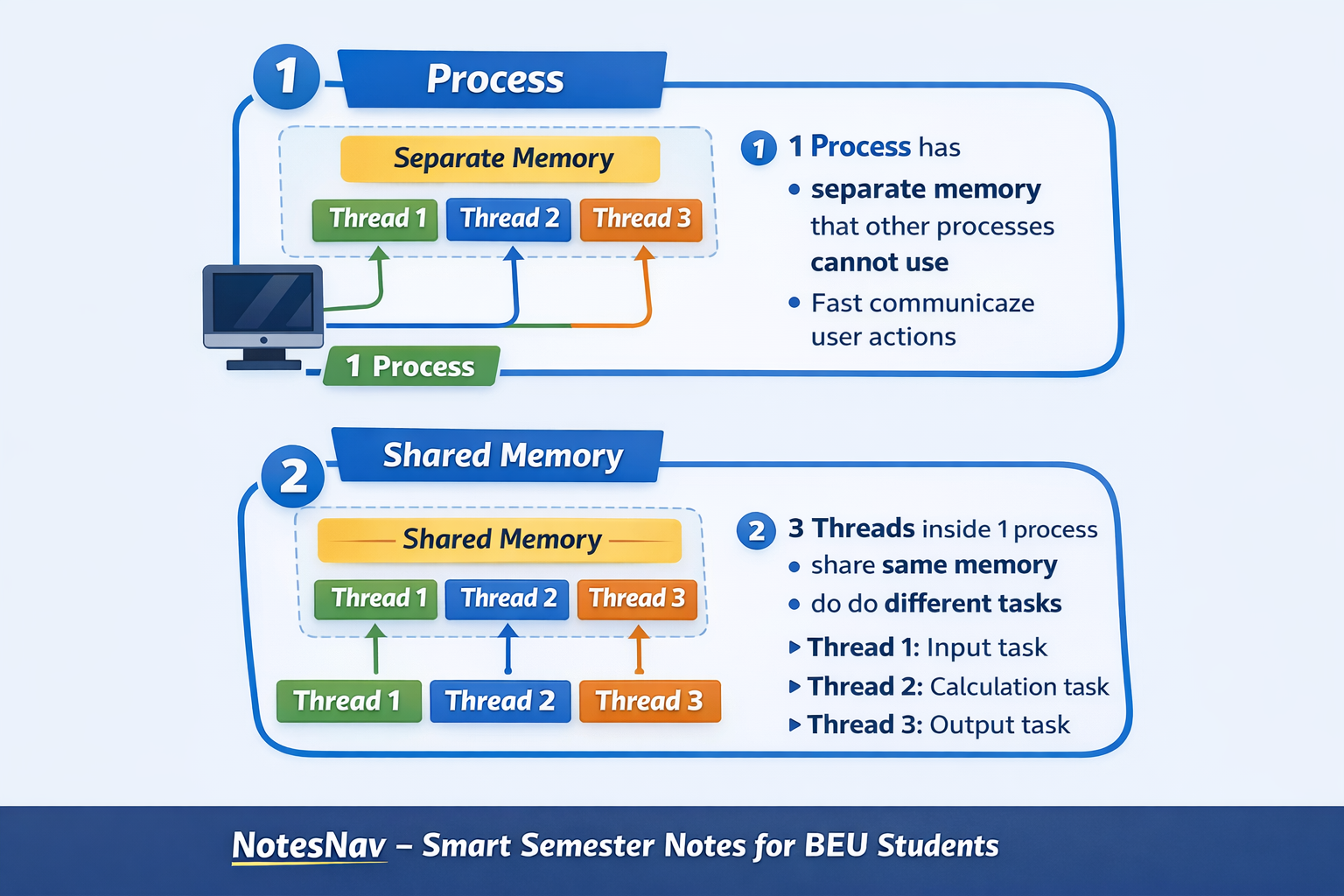
A thread is the smallest unit of execution in a program that runs independently inside a process. A single program can contain multiple threads, and each thread performs a specific task.
Threads share the same memory and resources of the process, which makes communication between them fast, but also requires careful handling to avoid conflicts.
A thread represents a single flow of control
Threads run inside a process
Multiple threads can exist in one process
Threads share memory and resources
Thread execution is managed by the JVM
Threads are lightweight compared to processes
example: When you use a media player, one thread plays audio, another handles video, and another listens to user input like pause or volume control. All these tasks happen at the same time.
Multithreading
Multithreading is the ability of a program to create and run more than one thread simultaneously. Each thread performs a different task, but all threads work together within the same program. Because threads share memory, switching between threads is fast, which improves overall performance of the application.
Multithreading means multiple threads running concurrently
All threads belong to the same process
Threads share data and resources
Context switching between threads is fast
Multithreading increases efficiency and performance
Improper handling can cause data inconsistency
example: In a web browser, one thread loads a webpage, another downloads files, and another responds to user actions like scrolling or clicking.
We can achive multithreading in java by two ways:
Using Thread class
using Runnable class
Why Multithreading is Needed
To perform multiple tasks at the same time: Java programs often need to do more than one job together, like reading input, processing data, and showing output. Multithreading allows these tasks to run simultaneously instead of waiting for one to finish.
To improve program performance: When a Java program uses multiple threads, different parts of the program can execute in parallel, which reduces total execution time and makes the program faster.
To keep applications responsive: In Java GUI applications, if a long task runs in the main thread, the screen freezes. Multithreading moves long operations to separate threads so the application remains responsive.
To handle multiple users or requests: Java server applications receive many client requests at the same time. Multithreading allows each request to be handled by a separate thread, preventing delays.
To utilize CPU efficiently: Modern systems have multi-core processors. Multithreading allows Java programs to use these cores effectively by running different threads in parallel.
To avoid blocking during I/O operations: File access, database calls, and network operations can block execution. Using separate threads ensures other parts of the Java program continue running during such operations.
Advantages of Multithreading
Improved performance: In Java, multiple threads can execute different tasks in parallel, which reduces overall execution time and makes programs run faster.
Better CPU utilization: Multithreading allows Java programs to use idle CPU time efficiently by running other threads when one thread is waiting or blocked.
Responsive applications: Java applications remain responsive because long-running tasks can be moved to background threads while the main thread continues handling user actions.
Efficient handling of multiple tasks: Java programs can divide complex work into smaller threads, making task management simpler and more organized.
Scalability in server applications: Multithreading helps Java servers handle many client requests simultaneously, improving scalability and throughput.
Reduced waiting time: Threads can run independently, so one slow task does not stop the execution of other tasks in the program.
Better resource sharing: Threads share the same memory space in Java, which allows fast communication and efficient use of system resources.
What is a Process
A process is a program that is currently in execution. When a Java program is started by the JVM, the operating system creates a separate process for it, which contains the program code, required memory, and system resources needed to run the program independently.
A process has its own separate memory space, including heap and stack, which is not shared with other processes.
In Java, each running application executes as a separate process, even if multiple Java programs are running on the same system.
A process is considered heavyweight because creating and managing it requires more time and system resources.
Communication between processes is slow because processes do not share memory and must use special communication mechanisms.
If one process crashes, it usually does not affect other processes, since each process runs independently.
Real-life example: Running a Java browser and a Java IDE at the same time creates two separate processes. If one stops working, the other continues normally.
What is a Thread
A thread is the smallest unit of execution within a process. In a Java program, a thread represents a single flow of control that performs a specific task while sharing the same memory and resources of the process in which it runs.
A thread runs inside a process and cannot exist independently.
Multiple threads can exist within a single Java process, allowing the program to perform multiple tasks at the same time.
Threads share the same memory space of the process, which makes communication between threads fast.
A thread is lightweight because creating and managing threads requires fewer system resources compared to processes.
In Java, thread execution is managed by the JVM, not directly by the programmer.
Because threads share memory, improper handling can lead to data inconsistency if synchronization is not used.
Real-life example:
In a Java-based text editor, one thread handles typing input, another performs spell checking, and another manages auto-saving, all within the same process.
Difference between Multiple Processes and Multiple Threads
Multiple Processes | Multiple Threads |
|---|---|
A process is an independent program in execution. | A thread is a lightweight unit of execution inside a process. |
Each process has its own separate memory space. | All threads of a process share the same memory space. |
Process creation is slow and resource-heavy. | Thread creation is fast and lightweight. |
Communication between processes is slow because memory is not shared. | Communication between threads is fast because memory is shared. |
Processes are more secure due to memory isolation. | Threads are less secure because shared memory can be misused. |
If one process crashes, other processes are not affected. | If one thread crashes, it may affect the entire process. |
Context switching between processes takes more time. | Context switching between threads takes less time. |
Processes are managed mainly by the operating system. | Threads are managed by the JVM and OS together in Java. |
Suitable for running different applications. | Suitable for running multiple tasks within the same application. |
Java program point of view: Java prefers multithreading inside a process because it provides better performance, faster communication, and efficient resource usage, especially for server and GUI applications.
Thread Life Cycle
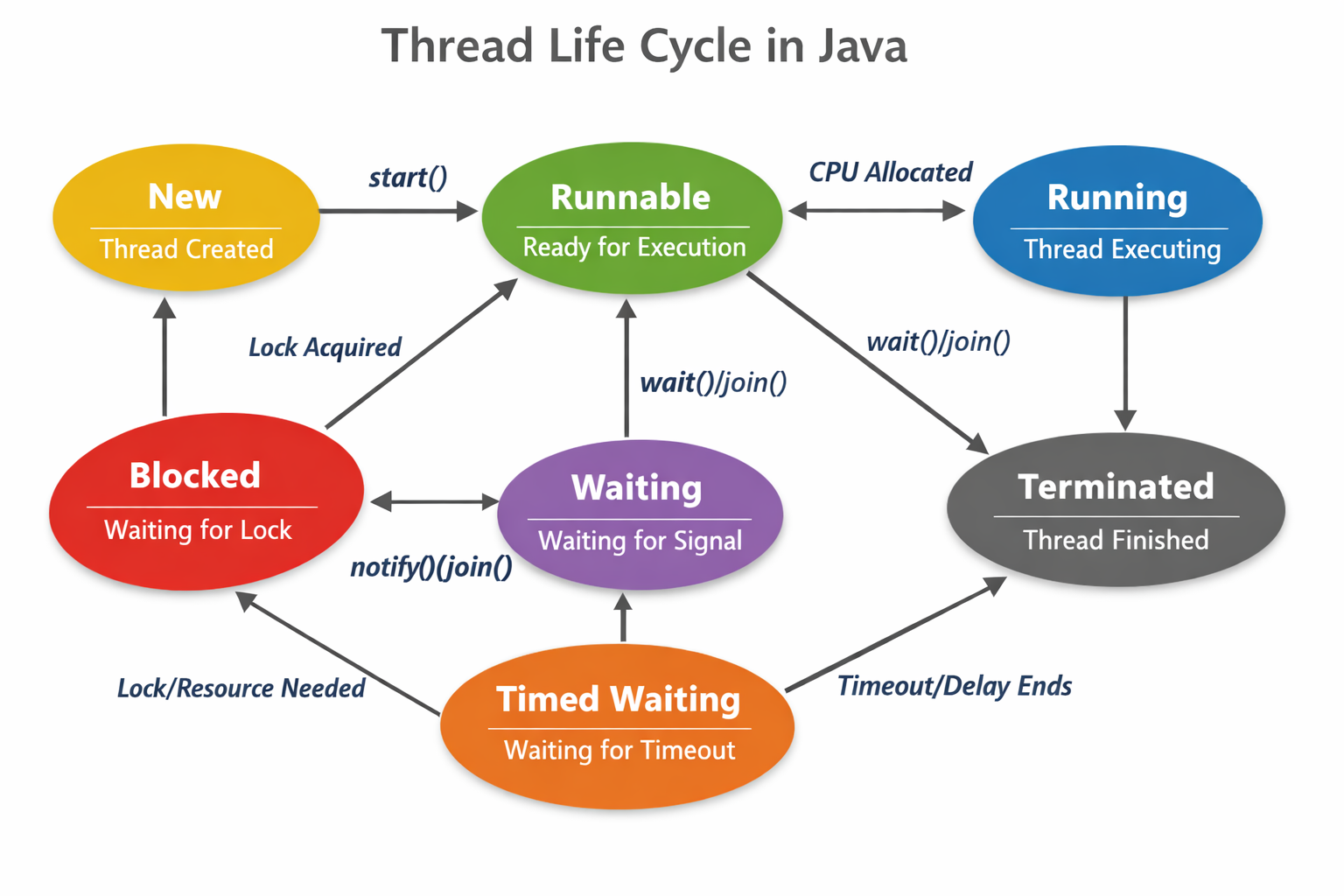
The thread life cycle in Java describes the different states a thread passes through from the moment it is created until it finishes execution. A thread does not run continuously; instead, it moves between multiple states depending on CPU availability, resource locks, waiting conditions, and completion of its task.
Understanding the thread life cycle helps in writing efficient multithreaded Java programs and avoiding issues like deadlock and unnecessary waiting.
A thread life cycle explains how a thread is created, executed, paused, and terminated
Thread states are managed by the JVM and the operating system
A thread can move from one state to another based on program logic and system conditions
At any time, a thread exists in only one state.
Thread States
New
Runnable
Running
Blocked
Waiting
Timed Waiting
Terminated
1. New State
The New state is the initial state of a thread in Java. A thread enters the New state when it is created using the Thread class, but its execution has not started yet. In this state, the thread exists only as an object in memory and has not been scheduled for execution by the JVM.
A thread is in New state immediately after the Thread object is created
The thread has not started execution. Only thread creation happens, not execution
The start() method is not called yet
The thread is not eligible for CPU time
The thread remains idle until start() is invoked
Calling run() directly does not change the state to running
A thread can enter New state only once in its life cycle
You can only call start() and stop() method when the thread in this state. if we call another method besides start() or stop() causes an IllegalThreadEexception error.
Java point of view example : When you write Thread t = new Thread();, the thread t is in the New state. It will stay in this state until t.start() is called.
2. Runnable State
The Runnable state is the state in which a thread is ready to run and is waiting for CPU time. In Java, when the start()method is called on a thread, it moves from the New state to the Runnable state. This does not mean the thread starts running immediately; it only means the thread is eligible to be executed by the CPU whenever the scheduler selects it.
A thread enters the Runnable state after the start() method is called
The thread is ready for execution but may not be running yet
The thread is waiting for CPU allocation by the scheduler
Multiple threads can be in Runnable state at the same time
The thread can move from Runnable to Running state when CPU is assigned
The thread can move back to Runnable if CPU is taken away
Runnable state includes both ready and running-ready conditions in Java
Java point of view example :
When t.start() is called, the thread t becomes Runnable. It will run only when the thread scheduler assigns CPU time to it.
3. Running State
The Running state is the state in which a thread is actually executing its task on the CPU. In this state, the thread’s run()method is actively running, and the thread is performing the operations defined inside it. A thread enters the Running state when the CPU scheduler selects it from the Runnable state and assigns CPU time.
A thread enters Running state when the CPU is allocated to it
The run() method starts executing in this state
Only one thread per CPU core can be in Running state at a time
The thread may not run until completion; execution depends on CPU scheduling
The thread can move from Running to Runnable if CPU time is taken away
The thread can move from Running to Blocked or Waiting state if it needs a resource
The thread can move to Terminated state after completing execution
Java point of view example : When the thread scheduler selects thread t and assigns CPU time, t enters the Running state and executes the code inside the run() method.
4. Blocked State
The Blocked state is the state in which a thread is temporarily stopped because it is waiting to acquire a resource or lock that is currently being used by another thread. In Java, this commonly happens when a thread tries to enter a synchronized block or method, but the required lock is already held by another thread.
A thread enters Blocked state when it cannot access a shared resource
This usually happens due to synchronization
The thread is waiting to acquire a lock on an object
The thread does not consume CPU time while blocked
Once the lock becomes available, the thread moves back to Runnable state
Blocked state is controlled by the JVM and thread scheduler
A blocked thread cannot proceed until the required resource is released
Java point of view example : If one thread is executing a synchronized method, and another thread tries to enter the same method, the second thread goes into the Blocked state until the first thread releases the lock.
5. Waiting State
The Waiting state is the state in which a thread pauses its execution indefinitely and waits for another thread to perform a specific action. In Java, a thread enters the Waiting state when it explicitly tells the JVM that it cannot continue until it receives a notification from another thread.
A thread enters Waiting state when it waits for another thread’s action
The waiting time is not fixed and can be infinite
The thread does not use CPU time while waiting
This state is entered using methods like wait() or join()
The thread remains waiting until it receives a notify() or notifyAll() call
After notification, the thread moves back to the Runnable state
Waiting state is commonly used in inter-thread communication
Java point of view example : If a thread calls wait() on an object, it enters the Waiting state and stays there until another thread calls notify() or notifyAll()on the same object.
6. Timed Waiting State
The Timed Waiting state is the state in which a thread pauses execution for a fixed period of time. Unlike the Waiting state, the thread does not wait indefinitely; it automatically becomes eligible to run again after the specified time expires.
A thread enters Timed Waiting state when it waits for a specific time duration
The waiting time is predefined and not infinite
The thread does not consume CPU time during this period
This state is entered using methods like sleep(time), wait(time), or join(time)
After the time expires, the thread automatically moves to the Runnable state
No notification from another thread is required after time completion
Timed Waiting is commonly used for delays, timeouts, and scheduled pauses
Java point of view example : When a thread calls Thread.sleep(1000), it enters the Timed Waiting state for 1 second and then becomes Runnable again.
7. Terminated State
The Terminated state is the state in which a thread has finished its execution and can no longer run again. Once a thread completes the execution of its run() method or stops due to an error, it enters the Terminated state permanently.
A thread enters Terminated state after completing the run() method
The thread cannot be restarted once terminated
Calling
start()again on a terminated thread causes an exceptionThe thread releases all resources and locks it was holding
Terminated state marks the end of the thread life cycle
A thread may also terminate due to an uncaught exception
Java point of view example : When the code inside the run() method finishes executing, the thread automatically enters the Terminated state.
Thread Class in Java
The Thread class in Java is a built-in class provided in the java.lang package that is used to create and control threads. It represents a thread of execution and provides methods to start, run, pause, and manage the life cycle of a thread in a Java program.
The Thread class is present in the java.lang package
It is used to create and manage threads
It contains the run() method where thread code is written
The start() method is used to begin thread execution
It provides methods like sleep(), join(), and interrupt()
Each Thread object represents one separate thread
Thread scheduling is handled by the JVM
Creating a Thread using Thread Class
Creating a thread using the Thread class is the most direct way to create a thread in Java. In this approach, a new class is created by extending the built-in Thread class, and the task to be executed by the thread is written inside the run() method. When the start() method is called, the JVM creates a new thread and executes the run() method concurrently with other threads.
A class must extend the Thread class
The run() method contains the code executed by the thread
Calling start() creates a new thread and calls
run()internallyCalling run() directly does not create a new thread
Each object of the class represents one separate thread
Thread scheduling is handled by the JVM, not by the programmer
This approach is simple but limits inheritance because Java does not support multiple inheritance
Syntax
class MyThread extends Thread {
    public void run() {
        // task to be executed by thread
    }
}
Example
class MyThread extends Thread {

    public void run() {
        System.out.println("Thread is running");
    }

    public static void main(String[] args) {
        MyThread t1 = new MyThread();
        t1.start();
    }
}
Output
Thread is running
new MyThread()→ thread is in New statet1.start()→ thread moves to Runnable stateJVM calls
run()→ thread enters Running stateAfter
run()finishes → thread goes to Terminated state
Steps to Create a Thread using Thread Class
Step 1: Create a class that extends Thread
class MyThread extends Thread {
}
This makes
MyThreada thread classIt inherits thread behavior from the Thread class
Step 2: Override the run() method
class MyThread extends Thread {
    public void run() {
        System.out.println("Thread task is running");
    }
}
The
run()method contains the taskJVM executes this method when the thread runs
Step 3: Create an object of the thread class
MyThread t1 = new MyThread();
A Thread object is created
Thread is in New state
Step 4: Call the start() method
t1.start();
start()tells the JVM to create a new threadThread moves to Runnable state
JVM calls
run()internally
Step 5: Thread executes the task
public void run() {
    System.out.println("Thread task is running");
}
Code inside
run()executes in Running state
Step 6: Thread completes execution
After
run()finishes, the thread enters the Terminated stateThe thread cannot be restarted again
Complete program
class MyThread extends Thread {

    public void run() {
        System.out.println("Thread task is running");
    }

    public static void main(String[] args) {
        MyThread t1 = new MyThread();
        t1.start();
    }
}
extend Thread → override run() → create object → call start()
How the Syntax Works
When we create a thread using the Thread class, Java uses inheritance so that our class gets all thread-related features. The actual work of multithreading is not done by us directly; it is handled by the JVM when we call specific methods in the correct order.
Step-by-step understanding of the syntax
class MyThread extends Thread {
This line tells Java that
MyThreadis a ThreadMyThreadnow gets all properties and methods of the Thread classJava allows only single inheritance, so once we extend
Thread, we cannot extend another class
public void run() {
    System.out.println("Thread is running");
}
run()contains the task that the thread will executeThe JVM looks for the run() method when a thread starts
Writing code outside
run()does not run in a new thread
MyThread t1 = new MyThread();
This creates a Thread object
At this point, the thread is in the New state
No new thread is running yet
t1.start();
This is the most important line
start()tells the JVM to create a new threadThe JVM allocates memory and places the thread in Runnable state
The JVM then calls the
run()method internallystart()is called only once per thread
What JVM actually does internally
Creates a new call stack for the thread
Registers the thread with the thread scheduler
Decides when the thread will run
Executes the
run()method when CPU is available
Important point
t1.run(); // NOT multithreading
Calling
run()directly does not create a new threadIt behaves like a normal method call
No new call stack is created
new Thread object → start() → Runnable → JVM calls run() → execution → termination
Example of Thread using Thread Class
1. Real-life idea: While downloading a file, a user can continue typing or using the app.
So one thread downloads the file, another keeps the app responsive.
Complete Java Program
class DownloadThread extends Thread {

    // This method contains the task of the thread
    public void run() {
        System.out.println("File downloading started...");
    }

    public static void main(String[] args) {

        // Creating thread object
        DownloadThread t1 = new DownloadThread();

        // Starting the thread
        t1.start();

        // Main thread continues its work
        System.out.println("User is using the application");
    }
}
Output
File downloading started...
User is using the application
(Order may change because threads run concurrently)
How This Code Works (Step by Step)
class DownloadThread extends Thread
This makes the class capable of working as a thread.run()method
Contains the task performed by the new thread (file download).DownloadThread t1 = new DownloadThread();
A thread object is created and is in the New state.t1.start();
JVM creates a new thread, moves it to Runnable state, and callsrun()internally.System.out.println("User is using the application");
This line runs in the main thread, showing both tasks run at the same time.
Key Points to Remember (Exam Focus)
start()creates a new threadrun()contains the thread taskBoth main thread and child thread run concurrently
Output order is not fixed
2. Counting using thread: While one task is counting numbers in the background, the main program is also counting.
This shows both threads working simultaneously.
Java Program (Counting Example with Thread)
class CountingThread extends Thread {

    // Task performed by child thread
    public void run() {
        for (int i = 1; i <= 5; i++) {
            System.out.println("Child Thread Count: " + i);
        }
    }

    public static void main(String[] args) {

        // Create thread object
        CountingThread t1 = new CountingThread();

        // Start child thread
        t1.start();

        // Main thread task
        for (int i = 1; i <= 5; i++) {
            System.out.println("Main Thread Count: " + i);
        }
    }
}
Output (Order may vary)
Child Thread Count: 1
Main Thread Count: 1
Child Thread Count: 2
Main Thread Count: 2
Main Thread Count: 3
Child Thread Count: 3
Main Thread Count: 4
Child Thread Count: 4
Main Thread Count: 5
Child Thread Count: 5
(Exact order can change because threads run concurrently)
How This Program Works
CountingThread extends Thread
Makes the class a thread.run()method
Contains the child thread task (counting 1 to 5).t1.start()
JVM creates a new thread and callsrun()internally.main()loop
Runs in the main thread and prints its own count.Both loops execute at the same time, showing true multithreading.
Important Exam Points
Two threads are running: main thread and child thread
Both execute independently
Output order is not guaranteed
This proves concurrent execution
Runnable Interface
The Runnable interface in Java is used to define a task that can be executed by a thread. It does not create a thread by itself; instead, it provides the code (work) that a thread will run when the thread starts.
Runnable is present in the java.lang package
Runnable interface is better than Thread class because it supports better object-oriented design and allows multiple inheritance while still achieving multithreading.
It contains only one method:
run()It represents what to do, not how to run
It does not start a thread by itself
What Runnable Actually Does
Think of Runnable as a job description.
Runnable tells what work should be done
Thread tells when and how to run that work
Runnable = task
Thread = worker
Why Runnable is Needed
Java does not support multiple inheritance
If you extend
Thread, you cannot extend any other classRunnable allows your class to extend another class and still use threading
Runnable separates logic (task) from execution (thread)
How Runnable Works with Thread (Step by Step)
class MyTask implements Runnable {
    public void run() {
        System.out.println("Task is running");
    }
}
This class only defines the task
No thread is created yet
MyTask task = new MyTask();
Task object is created
Still no new thread
Thread t1 = new Thread(task);
Thread object is created
Task is attached to thread
t1.start();
JVM creates a new thread
JVM internally calls
task.run()
Very Important Line
Thread t1 = new Thread(task);
This means:
“Create a thread and tell it which task to run”
👉 Runnable tells what to run, Thread tells how to run
Common Mistake (Exam Point)
task.run(); // NOT multithreading
This is just a normal method call
No new thread is created
Only this creates a new thread:
t1.start();
Creating a Thread using Runnable Interface
Creating a thread using the Runnable interface is a more flexible and recommended way in Java. In this approach, the task of the thread is separated from the thread itself. The class implements Runnable to define the work, and a Thread object is used to run that work. This design follows better object-oriented principles and avoids the limitation of single inheritance.
Why Runnable Interface is Needed
Java does not support multiple inheritance, so extending
Threadblocks extending another classRunnable allows a class to extend another class and still use threads
It separates task (logic) from thread control
It is more reusable and more flexible
Preferred in real Java applications and interviews
Steps to Create a Thread using Runnable Interface
Step 1: Create a class that implements Runnable
class MyTask implements Runnable {
}
This class represents the task, not the thread itself
Step 2: Override the run() method
class MyTask implements Runnable {
    public void run() {
        System.out.println("Thread task is running");
    }
}
run()contains the code executed by the thread
Step 3: Create an object of the Runnable class
MyTask task = new MyTask();
This object holds the task logic
Step 4: Create a Thread object and pass Runnable object
Thread t1 = new Thread(task);
Thread object is created using the Runnable task
Step 5: Call start() method
t1.start();
JVM creates a new thread
JVM internally calls
run()
Example (Runnable Interface)
class CountingTask implements Runnable {

    // Task performed by thread
    public void run() {
        for (int i = 1; i <= 5; i++) {
            System.out.println("Child Thread Count: " + i);
        }
    }

    public static void main(String[] args) {

        // Create Runnable object
        CountingTask task = new CountingTask();

        // Create Thread object
        Thread t1 = new Thread(task);

        // Start thread
        t1.start();

        // Main thread task
        for (int i = 1; i <= 5; i++) {
            System.out.println("Main Thread Count: " + i);
        }
    }
}
Output (Order may vary)
Main Thread Count: 1
Child Thread Count: 1
Main Thread Count: 2
Child Thread Count: 2
Child Thread Count: 3
Main Thread Count: 3
Main Thread Count: 4
Child Thread Count: 4
Main Thread Count: 5
Child Thread Count: 5
How JVM Handles Runnable
Runnable object → contains task only
Thread object → handles thread creation
start()→ JVM creates new threadJVM calls
run()of Runnable internally
Runnable = task, Thread = execution
Difference between Thread Class and Runnable Interface
Thread Class | Runnable Interface |
|---|---|
Thread is a class in Java. | Runnable is an interface in Java. |
A thread is created by extending the Thread class. | A thread is created by implementing the Runnable interface. |
The class cannot extend any other class because Java does not support multiple inheritance. | The class can extend another class, so it supports better design. |
The thread logic and thread control are combined in one class. | The task logic and thread control are separated. |
Each object of the class represents a thread. | The Runnable object represents only the task, not the thread. |
Less flexible and not recommended for large applications. | More flexible and recommended for real applications. |
Uses more memory because each thread is an object. | Uses less memory because multiple threads can share the same task. |
Suitable for simple programs and learning purpose. | Suitable for professional and scalable applications. |
Thread class already has methods like | Runnable has only one method: |
Syntax to create thread: | Syntax to create task: |
Object creation: | Object creation: |
Starting thread: | Starting thread: |
Thread → extends → object → start | Runnable → implements → task → Thread object → start |
Which Approach is Better: Thread or Runnable?
The Runnable interface approach is better than extending the Thread class. This is because Runnable separates the task (what to do) from the thread (how to run), supports better object-oriented design, and allows a class to extend another class while still using multithreading. Due to these reasons, Runnable is preferred in real Java applications and professional development.
Why Runnable is Better
Java does not support multiple inheritance, so extending Thread blocks extending another class
Runnable allows a class to extend another class and still use threads
Runnable separates task logic from thread execution
Better code reusability
Better memory usage
Preferred in large and real-world Java applications
Interrupting a Thread
Interrupting a thread means sending a signal to a running or waiting thread that it should stop its current activity and terminate gracefully.
In Java, interruption does not forcibly stop a thread. Instead, it is a polite request made by one thread to another, and it is up to the interrupted thread to handle this request properly.
Note:
If any thread is in sleeping or blocked state then we can easily interrupt the execution of thread by throwingIntterruptedException.
If thread not in the sleeping or wating state then thread execute normally.
Thread interruption is used to control thread execution
Java provides the interrupt() method to interrupt a thread
Interrupting a thread does not immediately stop it
The thread must check and handle the interruption
Mostly used with sleep(), wait(), and join()
interrupt() Method
interrupt()is a method of the Thread classIt sets the interrupted status of a thread
If a thread is in sleeping or waiting state, it throws an exception
If a thread is running normally, interruption acts as a flag
Syntax
threadName.interrupt();How interrupt() Works Internally
If the thread is running normally
→ interrupt flag is set to trueIf the thread is in sleep(), wait(), or join()
→ JVM throws InterruptedExceptionThe thread must handle the interruption explicitly
Key Concepts of Thread Interruption
1️⃣ void interrupt()
This method is used when one thread wants to tell another thread to stop or change its work.
When interrupt() is called, Java does not stop the thread immediately. It only sets a signal (flag) for that thread saying “you have been interrupted”.
👉 Think like this:
One thread is requesting, not forcing, the other thread to stop.
2️⃣ static boolean interrupted()
This method checks whether the current running thread is interrupted or not.
If the thread was interrupted, this method returns true.
⚠️ Important thing to remember:
After checking, this method clears the interrupt flag automatically (sets it back to false).
👉 Simple meaning:
It checks the interrupt
Then it resets the signal
3️⃣ boolean isInterrupted()
This method checks whether a particular thread is interrupted or not.
It does NOT clear the interrupt flag.
👉 Difference from interrupted():
isInterrupted()→ only checksinterrupted()→ checks and clears
So this method is used when you want to check the interrupt status without changing it.
4️⃣ InterruptedException
InterruptedException is a checked exception.
It occurs when a thread is sleeping, waiting, or joining, and another thread interrupts it.
This exception is thrown by methods like:
Thread.sleep()wait()join()
⚠️ Important JVM behavior:
When InterruptedException is thrown, Java automatically clears the interrupt flag.
👉 Simple meaning:
Thread was paused
Someone interrupted it
Java throws
InterruptedExceptionInterrupt signal is reset
Remember This
interrupt()→ sends interrupt requestinterrupted()→ checks current thread and clears flagisInterrupted()→ checks thread but does not clear flagInterruptedException→ happens when sleeping/waiting thread is interrupted
We will understand this using two cases, because interrupt works differently depending on thread state.
CASE 1: Interrupting a sleeping or waiting thread
class MyThread extends Thread {
    public void run() {
        try {
            System.out.println("Thread is sleeping");
            Thread.sleep(5000); // Timed Waiting
        } catch (InterruptedException e) {
            System.out.println("Thread interrupted while sleeping");
        }
    }
}

public class InterruptDemo {
    public static void main(String[] args) {
        MyThread t = new MyThread();
        t.start();

        t.interrupt(); // interrupt request
    }
}
Step 1: Object creation
MyThread t = new MyThread();
A thread object is created.
Thread state = NEW
No execution has started yet.
Step 2: Thread starts
t.start();
JVM creates a new call stack for this thread.
Thread state changes: NEW → RUNNABLE
JVM calls the
run()method internally.
Step 3: Entering run()
System.out.println("Thread is sleeping");
Output is printed.
Thread is still RUNNING.
Step 4: Thread goes to sleep
Thread.sleep(5000);
Thread state becomes TIMED_WAITING.
JVM pauses this thread for 5 seconds.
Thread is inactive but not dead.
Step 5: Interrupt request from main thread
t.interrupt();
Main thread sends an interrupt signal to
t.JVM checks current state of thread
t.
👉 Key JVM rule
If a thread is in:
sleep()wait()join()
then JVM immediately throws InterruptedException.
Step 6: InterruptedException thrown
JVM wakes up the sleeping thread immediately.
sleep()does not complete normally.Control jumps to the
catchblock.
Step 7: Catch block executes
System.out.println("Thread interrupted while sleeping");
Message printed.
Thread execution finishes.
Thread state becomes TERMINATED.
Final Result
✔ Thread stopped gracefully
✔ JVM handled interruption automatically
CASE 2: Interrupting a RUNNING thread
class MyThread extends Thread {
    public void run() {
        for (int i = 1; i <= 5; i++) {
            if (Thread.currentThread().isInterrupted()) {
                System.out.println("Thread interrupted manually");
                return;
            }
            System.out.println("Running " + i);
        }
    }
}

public class InterruptCheckDemo {
    public static void main(String[] args) {
        MyThread t = new MyThread();
        t.start();

        t.interrupt();
    }
}
Step 1: Thread starts
Thread state: NEW → RUNNABLE
JVM starts executing
run().
Step 2: Loop begins
for (int i = 1; i <= 5; i++)
Thread is RUNNING.
No sleep / wait / join used.
Step 3: Interrupt request
t.interrupt();
JVM sets the interrupt flag = true.
Thread is NOT stopped automatically.
👉 Important JVM rule
If thread is RUNNING:
interrupt()only sets a flagNo exception is thrown
Step 4: Manual interrupt check
Thread.currentThread().isInterrupted()
Thread checks its own interrupt flag.
Flag is
true.
Step 5: Graceful exit
return;
Thread stops execution by its own decision.
Thread state becomes TERMINATED.
Core JVM Concept
Thread State | What interrupt() does |
|---|---|
sleep / wait / join | Throws |
running normally | Sets interrupt flag only |
stopped | No effect |
The
interrupt()method does not stop a thread forcefully; it only requests the thread to stop by setting an interrupt flag or throwingInterruptedExceptionif the thread is blocked.
Example: Interrupting a Sleeping Thread
class MyThread extends Thread {

    public void run() {
        try {
            for (int i = 1; i <= 5; i++) {
                System.out.println("Child Thread Count: " + i);
                Thread.sleep(1000); // thread goes to timed waiting
            }
        } catch (InterruptedException e) {
            System.out.println("Thread interrupted");
        }
    }

    public static void main(String[] args) {

        MyThread t = new MyThread();
        t.start();

        // Interrupt the thread after starting
        t.interrupt();
    }
}
Output
Child Thread Count: 1
Thread interrupted
How This Code Works
t.start()
A new thread is created and starts executingrun().Thread.sleep(1000)
The thread enters Timed Waiting state.t.interrupt()
Main thread sends an interrupt signal to the child thread.InterruptedException
JVM throws this exception because the thread was sleeping.catch block
The interruption is handled safely.
Important Exam Points
interrupt()does not stop a thread forcefullyIt is a request, not a command
Used mainly to stop sleeping or waiting threads
Interrupted thread must handle InterruptedException
Ways to Handle Thread Interruption
The Thread class provides three methods for interrupting a thread -
void interrupt() − Interrupts the thread.
static boolean interrupted() − Tests whether the current thread has been interrupted.
boolean isInterrupted() − Tests whether the thread has been interrupted.
1️⃣ Using InterruptedException
This happens when a thread is sleeping or waiting.
Example Program
class MyThread extends Thread {

    public void run() {
        try {
            for (int i = 1; i <= 5; i++) {
                System.out.println("Child Thread Count: " + i);
                Thread.sleep(1000); // Timed Waiting
            }
        } catch (InterruptedException e) {
            System.out.println("Thread interrupted");
        }
    }

    public static void main(String[] args) {
        MyThread t = new MyThread();
        t.start();

        t.interrupt(); // interrupt request
    }
}
Output
Child Thread Count: 1
Thread interrupted
Working Explanation
start()→ thread starts executionsleep()→ thread enters Timed Waitinginterrupt()→ JVM throwsInterruptedExceptioncatchblock handles interruption safely
2️⃣ Using isInterrupted() Method
Used when thread is running normally, not sleeping.
Syntax
threadObject.isInterrupted();
Returns
trueif thread is interruptedDoes not clear interrupt status
Example
class MyThread extends Thread {

    public void run() {
        for (int i = 1; i <= 5; i++) {
            if (isInterrupted()) {
                System.out.println("Thread interrupted, stopping work");
                return;
            }
            System.out.println("Working: " + i);
        }
    }

    public static void main(String[] args) {
        MyThread t = new MyThread();
        t.start();
        t.interrupt();
    }
}
3️⃣ Using interrupted() Method (Static)
Syntax
Thread.interrupted();
Checks interruption status of current thread
Clears the interrupt flag after checking
Important Methods Related to Interruption
interrupt()→ sends interruption requestisInterrupted()→ checks interruption statusinterrupted()→ checks and clears status
What interrupt() Does NOT Do
Does not stop thread forcefully
Does not kill the thread
Does not guarantee immediate termination
Why Thread Interruption is Needed
To stop a thread safely without forcing termination
To control long-running background tasks
To wake up threads that are in sleeping or waiting state
To handle thread cancellation properly
To avoid unsafe methods like
stop()(deprecated)
Thread Priority
Thread priority in Java is a mechanism used to indicate the importance of a thread to the JVM scheduler so that it can decide which thread should get CPU time first when multiple threads are in the Runnable state.
Thread priority does not guarantee execution order, but it influences the scheduling decision made by the JVM.
Every thread in Java has a priority value
A higher-priority thread is more likely to be executed before a lower-priority one, the actual execution order is not guaranteed.
Priority is used by the JVM scheduler as a suggestion
Higher priority threads are generally preferred for execution
Thread priority does not guarantee which thread will run first
Actual execution depends on JVM and operating system
Priority is mainly used for performance tuning, not strict control
Priority Range in Java
Minimum priority value is 1
Maximum priority value is 10
Default priority value is 5
Priority Constants in Thread Class
Java defines priority values as public static final constants inside the Thread class so that they can be used directly without creating an object and cannot be changed.
public static final int MIN_PRIORITY = 1
Represents the lowest priority a thread can have.public static final int NORM_PRIORITY = 5
Represents the default priority assigned to a thread by the JVM.public static final int MAX_PRIORITY = 10
Represents the highest priority a thread can have.
Meaning of public static final
public → accessible from anywhere
static → belongs to the class, not to an object
final → value cannot be changed
Predefined Priority Constants
Thread.MIN_PRIORITY→ value 1Thread.NORM_PRIORITY→ value 5 (default)Thread.MAX_PRIORITY→ value 10
Default Thread Priority
Every thread has a default priority of 5
If not set explicitly, JVM assigns NORM_PRIORITY
Methods Used in Thread Priority
to set these priority java thread class has provided two prdefined methods.
1. setPriority()
2. getPriority()
1. setPriority() Method
Used to set the priority of a thread. The value must be between 1 and 10, or an IllegalArgumentException will be thrown. It should ideally be set before calling the start() method.
Syntax:
threadObject.setPriority(int priority);
2. getPriority() Method
Used to get the current priority of a thread.
Syntax:
threadObject.gthreadObject.getPriority();
etPriority();
How Thread Priority Works Internally
JVM scheduler checks Runnable threads
Threads with higher priority are usually selected first
Actual execution depends on:
JVM implementation
Operating system
CPU availability
Priority does not guarantee order
Example Program Showing Thread Priority
class PriorityExample extends Thread {

    // Task executed by thread
    public void run() {
        System.out.println(
            "Thread Name: " + getName() +
            ", Priority: " + getPriority()
        );
    }

    public static void main(String[] args) {

        // Creating thread objects
        PriorityExample t1 = new PriorityExample();
        PriorityExample t2 = new PriorityExample();

        // Setting priorities
        t1.setPriority(Thread.MIN_PRIORITY); // priority 1
        t2.setPriority(Thread.MAX_PRIORITY); // priority 10
class PriorityExample extends Thread {

    // Task executed by thread
    public void run() {
        System.out.println(
            "Thread Name: " + getName() +
            ", Priority: " + getPriority()
        );
    }

    public static void main(String[] args) {

        // Creating thread objects
        PriorityExample t1 = new PriorityExample();
        PriorityExample t2 = new PriorityExample();

        // Setting priorities
        t1.setPriority(Thread.MIN_PRIORITY); // priority 1
        t2.setPriority(Thread.MAX_PRIORITY); // priority 10

        // Starting threads
        t1.start();
        t2.start();
    }
}

        // Starting threads
        t1.start();
        t2.start();
    }
}
Output
Thread Name: Thread-1, Priority: 10
Thread Name: Thread-0, PriThread Name: Thread-1, Priority: 10
Thread Name: Thread-0, Priority: 1ority: 1
Explanation
Two thread objects
t1andt2are createdt1is given minimum priorityt2is given maximum priorityBoth threads enter the Runnable state
JVM scheduler usually selects the higher priority thread first
Output order may change depending on system behavior
Synchronizing Threads
Synchronization in Java is a mechanism used to control the execution of multiple threads when they access shared resources. It ensures that only one thread can access the critical section of code at a time, which helps prevent data inconsistency, race conditions and incorrect results in multithreaded programs.
Synchronization is a technique through which we can control multiple threads or among the no. of threads only one thread willl enter inside the Synchronized area.
In simple words, synchronization prevents multiple threads from interfering with each other while working on the same object or data.
The main purose of the synchronization is to overcome the problem of multithreading when multiple threads are trying to access same resources at the same time on that situation it may provides some wrong result. This problem is called a race condition.
👉 Synchronization solves this problem by allowing one thread at a time
Important points
Synchronization is used when multiple threads share the same object.
It ensures thread safety by allowing only one thread at a time.
Java uses a lock (monitor) to achieve synchronization.
Every object in Java has one intrinsic lock.
A thread must acquire the lock before entering synchronized code.
Other threads must wait until the lock is released.
Synchronization prevents race condition and data corruption.
Synchronization may slightly reduce performance due to locking overhead.
Why synchronization is needed
When multiple threads access shared data without synchronization, they may read and write values at the same time. This leads to incorrect results and inconsistent data. Synchronization ensures that shared data is accessed in a controlled manner.
What Happens Without Synchronization
Two or more threads access shared data simultaneously
Thread execution order becomes uncontrolled
Shared data may get corrupted
Final output becomes incorrect
This situation is called a race condition
Types of Synchronization in Java
Synchronized Method
Synchronized Block
synchronized Keyword - The synchronized keyword in Java is used to lock an object so that only one thread can execute the synchronized code at a time. Other threads must wait until the lock is released.
Simple Example Problem (Without Synchronization)
Imagine a bank account:
Balance = 1000
Two threads withdraw money at the same time
Without synchronization:
Both threads read balance as 1000
Both withdraw money
Final balance becomes incorrect
1. Synchronized Method
When a method is declared as synchronized, the entire method becomes a critical section and only one thread can execute it at a time.
The entire method is locked for one thread at a time.
Syntax
synchronized void methodName() {
    // critical section
}
Synchronization in Java – Bank Account Example
Think of a bank account with a balance of ₹1000.
Two people (threads) are trying to withdraw ₹700 at the same time.
If both threads access the account together without synchronization, the balance becomes wrong.
Case 1: WITHOUT Synchronization program
// BankAccount class represents a shared resource
class BankAccount {

    int balance = 1000;   // shared data

    // withdraw method is NOT synchronized
    void withdraw(int amount) {

        // both threads can enter here at the same time
        if (balance >= amount) {

            // deducting amount
            balance = balance - amount;

            // printing remaining balance
            System.out.println(
                Thread.currentThread().getName() +
                " withdrawn, remaining balance = " + balance
            );
        } else {

            // if balance is insufficient
            System.out.println(
                Thread.currentThread().getName() +
                " insufficient balance"
            );
        }
    }
}

// Customer thread
class Customer extends Thread {

    BankAccount account;   // reference to shared account

    Customer(BankAccount account) {
        this.account = account;
    }

    // thread execution starts here
    public void run() {
        account.withdraw(700);   // withdrawing money
    }
}

// Main class
public class WithoutSynchronization {
    public static void main(String[] args) {

        // single BankAccount object (shared)
        BankAccount account = new BankAccount();

        // two threads using same account
        Customer c1 = new Customer(account);
        Customer c2 = new Customer(account);

        c1.setName("Person-1");
        c2.setName("Person-2");

        // starting both threads
        c1.start();
        c2.start();
    }
}
Possible Output (WRONG / INCONSISTENT)
Person-1 withdrawn, remaining balance = 300
Person-2 withdrawn, remaining balance = -400
Why this output is WRONG
Both threads access the same balance at the same time
Both see balance = 1000
Both withdraw 700
Balance becomes negative, which is impossible in real life
This problem is called Race Condition.
Case 2: WITH Synchronization program
// BankAccount class represents a shared resource
class BankAccount {

    int balance = 1000;   // shared data

    // synchronized method// BankAccount class represents a shared resource
class BankAccount {

    int balance = 1000;   // shared data

    // synchronized method
    synchronized void withdraw(int amount) {

        // only ONE thread can enter this method at a time
        if (balance >= amount) {

            // deducting amount safely
            balance = balance - amount;

            // printing remaining balance
            System.out.println(
                Thread.currentThread().getName() +
                " withdrawn, remaining balance = " + balance
            );
        } else {

            // second thread will come here if balance is low
            System.out.println(
                Thread.currentThread().getName() +
                " insufficient balance"
            );
        }
    }
}

// Customer thread
class Customer extends Thread {

    BankAccount account;   // shared object reference

    Customer(BankAccount account) {
        this.account = account;
    }

    public void run() {
        account.withdraw(700);   // withdrawing money
    }
}

// Main class
public class WithSynchronization {
    public static void main(String[] args) {

        // single shared BankAccount object
        BankAccount account = new BankAccount();

        // two threads sharing same object
        Customer c1 = new Customer(account);
        Customer c2 = new Customer(account);

        c1.setName("Person-1");
        c2.setName("Person-2");

        // starting threads
        c1.start();
        c2.start();
    }
}

    synchronized void withdraw(int amount) {

        // only ONE thread can enter this method at a time
        if (balance >= amount) {

            // deducting amount safely
            balance = balance - amount;

            // printing remaining balance
            System.out.println(
                Thread.currentThread().getName() +
                " withdrawn, remaining balance = " + balance
            );
        } else {

            // second thread will come here if balance is low
            System.out.println(
                Thread.currentThread().getName() +
                " insufficient balance"
            );
        }
    }
}

// Customer thread
class Customer extends Thread {

    BankAccount account;   // shared object reference

    Customer(BankAccount account) {
        this.account = account;
    }

    public void run() {
        account.withdraw(700);   // withdrawing money
    }
}

// Main class
public class WithSynchronization {
    public static void main(String[] args) {

        // single shared BankAccount object
        BankAccount account = new BankAccount();

        // two threads sharing same object
        Customer c1 = new Customer(account);
        Customer c2 = new Customer(account);

        c1.setName("Person-1");
        c2.setName("Person-2");

        // starting threads
        c1.start();
        c2.start();
    }
}
Output (CORRECT / CONSISTENT)
Person-1 withdrawn, remaining balance = 300
Person-2 insufficient balance
Step-by-Step Code Flow (VERY IMPORTANT)
Both threads share one BankAccount object
withdraw()method is synchronizedFirst thread enters and gets object lock
Second thread waits
Balance updated correctly
Lock released
Second thread executes and sees insufficient balance
What Synchronization Did (Core Concept)
Applied object-level lock
Allowed only one thread at a time
Prevented race condition
Maintained data consistency
2. Synchronized Block
A synchronized block is used when we want to synchronize only a specific part of a method, not the whole method.
This improves performance because only the critical section is locked.
Syntax
synchronized(objectReference) {
    // critical section
}
Same Bank Example
Bank balance = 1000
Two customers withdraw 700
Same account object is shared
Case 1: WITHOUT Synchronized Block
// Shared BankAccount class
class BankAccount {

    int balance = 1000;   // shared data

    void withdraw(int amount) {

        // this whole method is NOT synchronized
        if (balance >= amount) {

            // critical section (unsafe)
            balance = balance - amount;

            System.out.println(
                Thread.currentThread().getName() +
                " withdrawn, remaining balance = " + balance
            );
        } else {
            System.out.println(
                Thread.currentThread().getName() +
                " insufficient balance"
            );
        }
    }
}

// Thread class
class Customer extends Thread {

    BankAccount account;

    Customer(BankAccount account) {
        this.account = account;
    }

    public void run() {
        account.withdraw(700);
    }
}

public class WithoutSyncBlock {
    public static void main(String[] args) {

        BankAccount account = new BankAccount();

        Customer c1 = new Customer(account);
        Customer c2 = new Customer(account);

        c1.setName("Person-1");
        c2.setName("Person-2");

        c1.start();
        c2.start();
    }
}
Possible Output (WRONG)
Person-1 withdrawn, remaining balance = 300
Person-2 withdrawn, remaining balance = -400
Why this problem happens
Both threads enter the method together
Balance check happens at same time
Both withdraw money
Balance becomes incorrect
This is race condition.
Case 2: WITH Synchronized Block
// Shared BankAccount class
class BankAccount {

    int balance = 1000;   // shared data

    void withdraw(int amount) {

        // synchronized block
        synchronized (this) {
            // only this part is synchronized
            if (balance >= amount) {

                // safe critical section
                balance = balance - amount;

                System.out.println(
                    Thread.currentThread().getName() +
                    " withdrawn, remaining balance = " + balance
                );
            } else {
                System.out.println(
                    Thread.currentThread().getName() +
                    " insufficient balance"
                );
            }
        }

        // non-critical code (not synchronized)
        // other threads can execute this part
    }
}

// Thread class
class Customer extends Thread {

    BankAccount account;

    Customer(BankAccount account) {
        this.account = account;
    }

    public void run() {
        account.withdraw(700);
    }
}

public class WithSyncBlock {
    public static void main(String[] args) {

        BankAccount account = new BankAccount();

        Customer c1 = new Customer(account);
        Customer c2 = new Customer(account);

        c1.setName("Person-1");
        c2.setName("Person-2");

        c1.start();
        c2.start();
    }
}
Output
Person-1 withdrawn, remaining balance = 300
Person-2 insufficient balance
Step-by-Step Code Flow
Both threads call
withdraw()Only the code inside
synchronized(this)is lockedFirst thread acquires object lock
Second thread waits
Balance updated safely
Lock released
Second thread executes and sees insufficient balance
Why Synchronized Block is Better
Locks only critical code
Improves performance
More flexible than synchronized method
Avoids unnecessary locking
Difference
Synchronized method → locks entire method
Synchronized block → locks specific code only
A synchronized block allows only one thread at a time to execute a critical section of code, ensuring thread safety with better performance.
Inter-Thread Communication in Java
Inter-thread communication in Java is a mechanism that allows threads to communicate with each other and coordinate their execution. It is mainly used when one thread needs to wait for another thread to complete some work before continuing.
Java provides this mechanism using the methods wait(), notify(), and notifyAll().
Important points
Inter-thread communication is used for cooperation between threads.
It avoids busy waiting (continuous checking).
Methods used are
wait(),notify(), andnotifyAll().These methods belong to the Object class, not the Thread class.
They must be called inside a synchronized block or synchronized method.
Threads communicate using a shared object.
Real-Life Example (Bank Account – Deposit & Withdraw)
One thread withdraws money
Another thread deposits money
Withdraw thread should wait if balance is low
Deposit thread should notify after adding money
Case: Withdraw waits, Deposit notifies
// Shared resource
class BankAccount {

    int balance = 1000;

    // withdraw method
    synchronized void withdraw(int amount) {

        // if balance is not enough
        if (balance < amount) {
            System.out.println("Insufficient balance, waiting for deposit");

            try {
                // current thread goes into waiting state
                wait();
            } catch (InterruptedException e) {
            }
        }

        // after being notified
        balance = balance - amount;
        System.out.println("Withdrawal successful, remaining balance = " + balance);
    }

    // deposit method
    synchronized void deposit(int amount) {

        // adding money
        balance = balance + amount;
        System.out.println("Amount deposited, balance = " + balance);

        // waking up waiting thread
        notify();
    }
}

// Withdraw thread
class WithdrawThread extends Thread {

    BankAccount account;

    WithdrawThread(BankAccount account) {
        this.account = account;
    }

    public void run() {
        account.withdraw(1500);
    }
}

// Deposit thread
class DepositThread extends Thread {

    BankAccount account;

    DepositThread(BankAccount account) {
        this.account = account;
    }

    public void run() {
        account.deposit(2000);
    }
}

// Main class
public class InterThreadDemo {
    public static void main(String[] args) {

        BankAccount account = new BankAccount();

        WithdrawThread w = new WithdrawThread(account);
        DepositThread d = new DepositThread(account);

        w.start();
        d.start();
    }
}
Output
Insufficient balance, waiting for deposit
Amount deposited, balance = 3000
Withdrawal successful, remaining balance = 1500
Step-by-Step Code Flow
Withdraw thread starts first.
Balance is less than withdrawal amount.
Withdraw thread calls
wait()and releases the lock.Withdraw thread goes into waiting state.
Deposit thread enters synchronized method.
Deposit thread adds money.
Deposit thread calls
notify().Waiting withdraw thread is woken up.
Withdraw thread continues execution and withdraws money.
wait()
Makes the current thread pause
Releases the object lock
Thread waits until notified
notify()
Wakes up one waiting thread
Lock is given after synchronized block ends
notifyAll()
Wakes up all waiting threads
Important Rules (Exam Focus)
wait(),notify(),notifyAll()must be called inside synchronized blockThey work on object lock, not thread
Used to coordinate threads, not stop them
Inter-thread communication allows threads to cooperate using wait and notify methods on a shared object.