Java Unit 4 Exception Handling Notes for BTech CSE (AI & ML) | BEU
Download Java Unit-4 Exception Handling handwritten notes PDF for BTech CSE (AI & ML) under BEU. Covers Error vs Exception, checked and unchecked exceptions, try-catch-finally, throw, throws, exception hierarchy, and user-defined exceptions with exam-oriented explanations.

Java Unit-4 focuses on Exception Handling, which is an essential topic for BTech CSE (AI & ML) students under Bihar Engineering University (BEU). This unit explains how Java programs handle runtime errors and abnormal conditions in a safe and controlled way. Questions from this unit are commonly asked in semester exams, especially theory questions like Error vs Exception, checked and unchecked exceptions, and try-catch blocks.
These Java Unit-4 handwritten notes are prepared strictly according to the BEU syllabus, with simple explanations, real examples, and exam-ready points. Exception Handling is important not only for exams but also for real-world Java programming, because it helps prevent program crashes and improves reliability.
In this unit, students learn the difference between error and exception, exception hierarchy, types of exceptions, checked and unchecked exceptions, and the complete usage of try, catch, finally, throw, and throws. The unit also covers multiple catch blocks, nested try statements, re-throwing exceptions, and creating user-defined exceptions, all explained in an easy and step-by-step manner.
These notes are useful for students searching for Java Exception Handling notes, Java handwritten notes PDF download, Java semester exam notes BEU, and Java Unit-4 notes for BTech CSE AI Ml.
Here is the syllabus of Java unit -4 Bihar engineering university (BEU) for java as per new syllabus of BEU Btech 2025-2026.
Exception Handling: Introduction to error and exception, Error vs Exception, Concepts of Exception Handling,Benefits of exception handling, exception types, exception hierarchy, checked and unchecked exceptions, usage of try, catch, throw, throws and finally, multiple catch clauses,nested try statements, re throwing exceptions, creating own exception sub classes.
What is an Error in Java
An error in Java is a serious problem that occurs during program execution and is not caused by the programmer’s code logic. Errors usually happen due to system-level issues, such as lack of memory or hardware failure. These problems are beyond the control of the program, and Java does not expect the programmer to handle them.
Errors are generated by the JVM (Java Virtual Machine) and generally indicate situations where the program cannot continue execution safely. Because errors are critical, they are not meant to be caught or handled using try-catch blocks in normal programs.
Errors occur due to system or environment problems, not due to logical mistakes in code.
Errors are generated by the JVM, not directly by the programmer.
Errors are unchecked, meaning they are not checked at compile time.
Errors usually cause abnormal termination of the program.
Errors are not recoverable, so programs are not expected to handle them.
Error classes are present in the
java.langpackage.
Common examples of Errors
OutOfMemoryError– occurs when JVM runs out of memoryStackOverflowError– occurs due to infinite recursionVirtualMachineError– occurs due to JVM failure
What is an Exception in Java
An exception in Java is an unexpected event that occurs during program execution and disrupts the normal flow of the program. Exceptions usually happen due to logical mistakes, invalid input, or runtime conditions, such as dividing a number by zero or accessing an invalid array index. Unlike errors, exceptions are manageable, and Java provides a proper mechanism to handle them.
Exceptions are generated either by the JVM or by the programmer, and they can be handled using try, catch, finally, throw, and throws keywords. By handling exceptions, a program can continue execution safely instead of crashing.
Exceptions occur due to runtime problems in the program logic.
Exceptions can be handled using Java exception handling mechanism.
Exceptions are objects of classes that extend the Exception class.
Exceptions may be generated by the JVM or explicitly by the programmer.
Proper exception handling prevents abnormal termination of programs.
Exception classes are part of the
java.langpackage.
Common examples of Exceptions
ArithmeticException– occurs when division by zero happensNullPointerException– occurs when accessing a null objectArrayIndexOutOfBoundsException– occurs when accessing invalid array index
Difference between Error and Exception in Java
Error | Exception |
|---|---|
An error is a serious system-level problem that occurs during program execution. | An exception is a runtime problem that occurs due to program logic or invalid input. |
Errors are caused by JVM or system failure. | Exceptions are caused by program code or runtime conditions. |
Errors are not recoverable. | Exceptions are recoverable. |
Errors are not meant to be handled by the program. | Exceptions can be handled using try-catch blocks. |
Errors usually lead to abnormal termination of the program. | Exceptions allow the program to continue execution if handled properly. |
Errors are subclasses of the Error class. | Exceptions are subclasses of the Exception class. |
Errors are unchecked in nature. | Exceptions can be checked or unchecked. |
Examples: | Examples: |
Errors are serious system problems that cannot be handled, whereas exceptions are runtime problems that can be handled in Java programs.
Concepts of Exception Handling in Java
Exception handling in Java is a mechanism that allows a program to handle runtime problems in a controlled wayinstead of terminating abruptly. When an exception occurs, Java creates an exception object and transfers the control of the program from the normal flow to the exception handling code. This mechanism helps the program to respond properly to unexpected situations.
When an exception occurs, the JVM first checks whether the exception is handled in the current method. If it is not handled there, the JVM passes the exception to the calling method. This process continues until the exception is handled or the program terminates. This process is known as exception propagation.
Java provides a default exception handler that prints the exception information and stops the program if the exception is not handled by the programmer. To avoid this, Java provides keywords like try, catch, finally, throw, and throws so that programmers can handle exceptions manually and keep the program running safely.
Exception handling prevents abnormal termination of programs.
Exceptions are handled using special blocks and keywords provided by Java.
When an exception occurs, normal program flow stops and control moves to handling code.
JVM searches for a matching catch block to handle the exception.
If no handler is found, the default exception handler terminates the program.
Exception handling improves reliability and robustness of Java programs.
Exception handling is a mechanism in Java that handles runtime errors and maintains normal program execution.
Benefits of Exception Handling in Java
It prevents abnormal termination of the program.
It allows the program to handle runtime errors gracefully.
It helps in separating error-handling code from normal program code.
It improves the reliability and robustness of the program.
It makes programs easier to debug and maintain.
It allows programmers to show meaningful error messages to users.
It helps the program to continue execution even after an error occurs.
Types of Exceptions
1. Built-in Exceptions
Checked Exceptions
IOException
FileNotFoundException
SQLException
ClassNotFoundException
InterruptedException
Unchecked Exceptions (RuntimeException)
ArithmeticException
NullPointerException
ArrayIndexOutOfBoundsException
NumberFormatException
ClassCastException
2. User-Defined Exceptions
Custom exceptions created by programmer
Created by extending
Exceptionclass
1) Built-in Exceptions
Built-in exceptions are the exceptions that are already provided by Java. These exceptions occur due to common programming mistakes such as invalid input, wrong calculations, or accessing invalid memory locations. They are part of the Java standard library and are automatically thrown by the JVM.
Examples of built-in exceptions include ArithmeticException, NullPointerException, and ArrayIndexOutOfBoundsException.
1) Checked Exceptions
Checked exceptions are the exceptions that are checked at compile time. The compiler forces the programmer to either handle these exceptions using try-catch or declare them using throws. These exceptions usually occur due to external conditions such as file handling or database access.
Example
import java.io.FileReader;

public class Test {
    public static void main(String[] args) throws Exception {
        FileReader fr = new FileReader("file.txt");
    }
}
Here, FileNotFoundException is a checked exception. The compiler checks it at compile time, so handling or declaring it is mandatory.
2) Unchecked Exceptions
Unchecked exceptions are the exceptions that are not checked at compile time. These exceptions occur due to logical mistakes in the program, and handling them is not compulsory. They are checked at runtime.
Example
public class Test {
    public static void main(String[] args) {
        int a = 10 / 0;
    }
}
This code causes ArithmeticException at runtime. The compiler does not force handling, so it is an unchecked exception.
2) User-defined Exceptions
User-defined exceptions are the exceptions that are created by the programmer according to application requirements. When the built-in exceptions are not sufficient to describe a specific problem, programmers create their own exception classes. These exceptions help in providing custom and meaningful error messages.
User-defined exceptions are created by extending the Exception class or one of its subclasses.
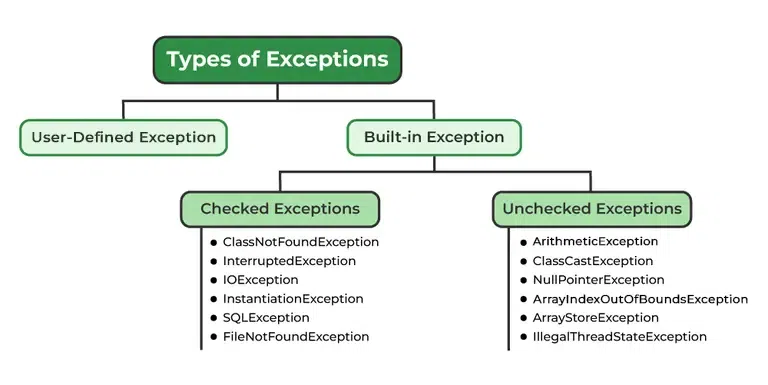
Exception Hierarchy in Java
The exception hierarchy in Java shows how exception classes are organized in a tree-like structure. At the top of the hierarchy is the Throwable class. All errors and exceptions in Java are subclasses of this class. This hierarchy helps Java identify which exception has occurred and how it should be handled.
The Throwable class is divided into two main branches: Error and Exception. Both represent abnormal conditions, but they are used for different purposes. This clear separation helps Java decide whether a problem should be handled by the program or not.
Error
The Error class represents serious system-level problems such as memory issues or JVM failures. These problems are not caused by program logic and are not meant to be handled using try-catch blocks. Errors usually lead to program termination.
Exception
The Exception class represents runtime problems that occur due to program logic or external conditions. These problems can be handled using exception handling mechanisms. Because of this, exceptions are commonly handled in Java programs.
The Exception class is further divided into checked exceptions and unchecked exceptions.
Checked exceptions are checked at compile time and must be handled, while unchecked exceptions are checked at runtime and handling them is optional.
Hierarchy Flow
Throwable
 ├── Error
 └── Exception
      ├── Checked Exceptions (Compile time)
      └── Unchecked Exceptions (RuntimeException)
Why Exception Hierarchy is Important
It helps Java classify different types of problems.
It allows programmers to catch specific exceptions instead of handling all errors in one block.
It makes exception handling more structured and meaningful.
It helps the JVM decide which catch block should execute.
In Java, the exception hierarchy is a class structure where
Throwableis the root class, divided intoErrorandException, andExceptionis further divided into checked and unchecked exceptions.
Difference between Checked and Unchecked Exceptions
Checked Exceptions | Unchecked Exceptions |
|---|---|
Checked exceptions are checked at compile time. | Unchecked exceptions are checked at runtime. |
The compiler forces the programmer to handle these exceptions. | The compiler does not force handling of these exceptions. |
These exceptions usually occur due to external resourceslike files or databases. | These exceptions usually occur due to logical errors in the program. |
They must be handled using try-catch or declared using throws. | Handling is optional and not mandatory. |
They are subclasses of the Exception class (excluding RuntimeException). | They are subclasses of RuntimeException. |
Program will not compile if they are not handled. | Program compiles successfully even if not handled. |
Examples: | Examples: |
Checked exceptions are checked at compile time and must be handled, whereas unchecked exceptions are checked at runtime and handling them is optional.
try block in Java
The try block in Java is used to write code that may cause an exception. Java checks the statements inside the try block during execution. If an exception occurs inside the try block, the normal flow of the program stops and control is transferred to the corresponding catch block. A try block cannot exist alone; it must be followed by at least one catch block or a finally block.
Important points
The
tryblock contains risky code.An exception can occur only inside the try block.
If an exception occurs, remaining statements of try are skipped.
A
tryblock must be followed by catch or finally.One
tryblock can have multiple catch blocks.
Syntax of try
try {
    // risky code
}
catch block in Java
The catch block in Java is used to handle the exception that occurs in the try block. When an exception occurs, Java searches for a matching catch block based on the exception type. The catch block prevents the program from terminating abnormally and allows it to continue execution.
Important points
The
catchblock handles the exception thrown in try.Each
catchblock handles only one type of exception.The catch block must be written after the try block.
Multiple
catchblocks can be used with onetry.If no matching
catchblock is found, the JVM’s default exception handler executes and the program terminates abnormally.The JVM default handler prints the exception name, description, and stack trace, then terminates the program.
Syntax of catch
catch (ExceptionType e) {
    // handling code
}
Combined try–catch structure
try {
    int a = 10 / 0;
} catch (ArithmeticException e) {
    System.out.println("Error handled");
}
The
tryblock is used to write risky code, and thecatchblock is used to handle the exception that occurs in the try block.
catch block syntax — why we pass exception type
catch (ExceptionType e) {
    // handling code
}
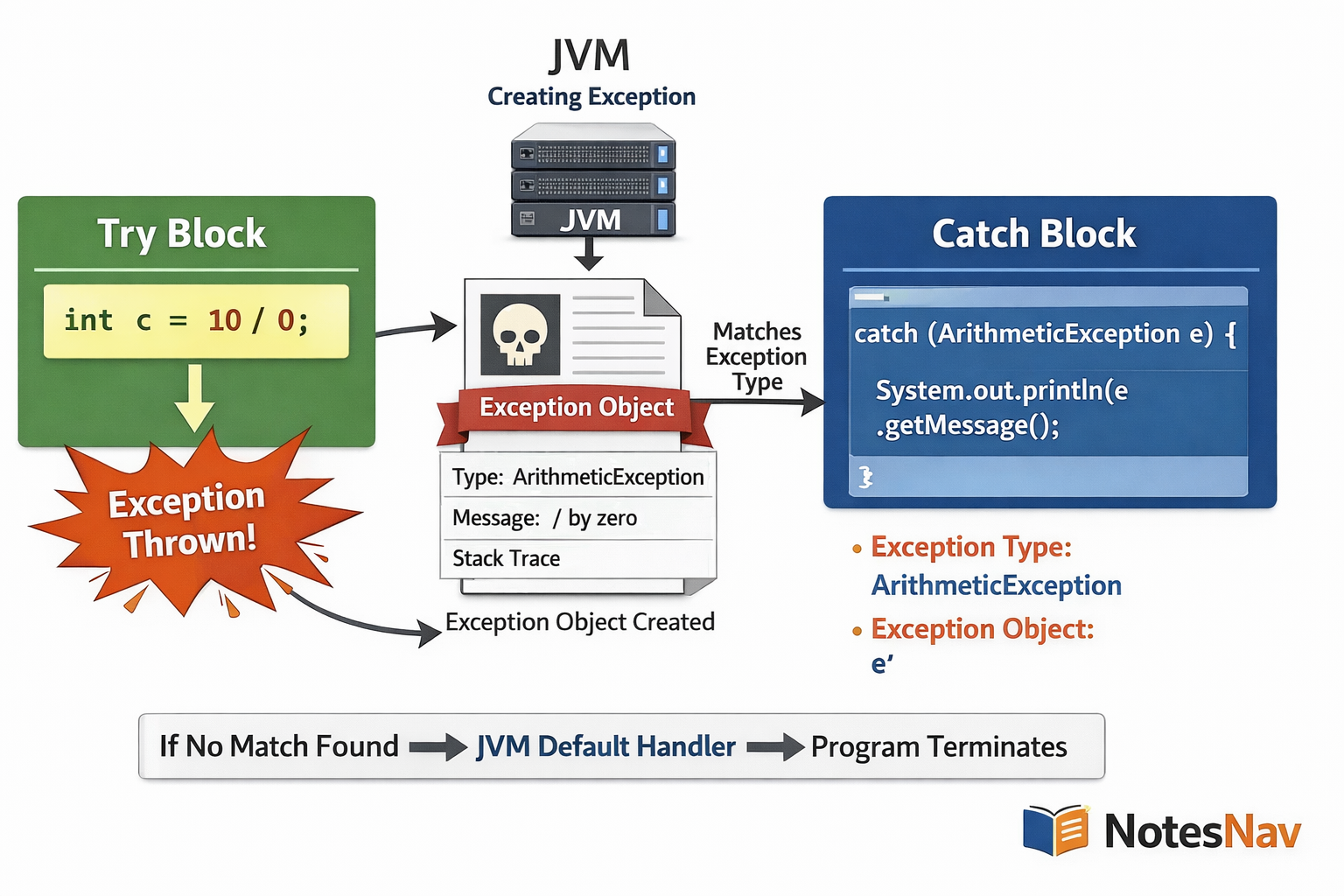
When an exception occurs inside the try block, the JVM creates an exception object of a specific exception class, such as ArithmeticException or NullPointerException. This object contains details about the error, like the error message and the line number.
In the catch block, the exception type (ExceptionType) is written to tell the JVM which kind of exception this catch block can handle. The JVM compares the thrown exception object with the exception type written in the catch block. If the types match (or the catch type is a parent class), the JVM executes that catch block.
The variable name (for example e) is a reference to the exception object created by the JVM. Using this reference, the programmer can access exception details such as e.getMessage() or print the stack trace using e.printStackTrace().
If the exception type written in the catch block does not match the thrown exception, the JVM skips that catch blockand checks the next catch block. If no matching catch block is found, the JVM calls its default exception handler and terminates the program.
Very important exam-ready line
The exception type in the catch block tells the JVM which exception it can handle, and the exception object provides details about the error.
try and catch Example
public class TryCatchExample {
    public static void main(String[] args) {

        int a = 20;
        int b = 0;

        try {
            // risky code
            int result = a / b;
            System.out.println("Result: " + result);
        }
        catch (ArithmeticException e) {
            // exception handling code
            System.out.println("Division by zero is not allowed");
        }

        System.out.println("Program executed successfully");
    }
}
Output
Division by zero is not allowed
Program executed successfully
Step-by-step Explanation (Very Important)
The program starts execution from the
mainmethod.Variables
aandbare initialized with values20and0.The division operation
a / bis written inside thetryblock because it may cause an exception.During execution, division by zero occurs, so the JVM creates an
ArithmeticExceptionobject.The JVM immediately stops executing the remaining statements inside the
tryblock.The JVM searches for a matching
catchblock and findscatch (ArithmeticException e).The matching
catchblock executes and prints the error message.After the catch block, the program continues normally and prints the last statement.
This shows that the program does not terminate abnormally because the exception is handled properly.
Important exam understanding
Code inside
tryruns normally until an exception occurs.Once an exception occurs, control is transferred to the matching catch block.
If the exception is handled, the program continues execution.
If no matching catch is found, the JVM default exception handler terminates the program.
Same Example WITHOUT Exception Handling
Code (No try–catch used)
public class WithoutTryCatch {
    public static void main(String[] args) {

        int a = 20;
        int b = 0;

        // risky code without handling
        int result = a / b;
        System.out.println("Result: " + result);

        System.out.println("Program executed successfully");
    }
}
Output
Exception in thread "main" java.lang.ArithmeticException: / by zero
    at WithoutTryCatch.main(WithoutTryCatch.java:8)
Step-by-step Explanation (What JVM does)
The program starts execution from the
mainmethod.Variables
aandbare initialized with values20and0.The statement
a / bis executed.Division by zero occurs, so the JVM creates an
ArithmeticExceptionobject.Since there is no try–catch block, the JVM does not find any handler.
The JVM then uses its default exception handler.
The default handler prints:
Exception name
Error message
Line number (stack trace)
After printing the error details, the JVM terminates the program immediately.
The statement
System.out.println("Program executed successfully");never executes.
Comparison
With try–catch | Without try–catch |
|---|---|
Exception is handled | Exception is not handled |
Program continues | Program terminates |
User-friendly message | JVM error message |
Controlled execution | Abnormal termination |
finally block in Java
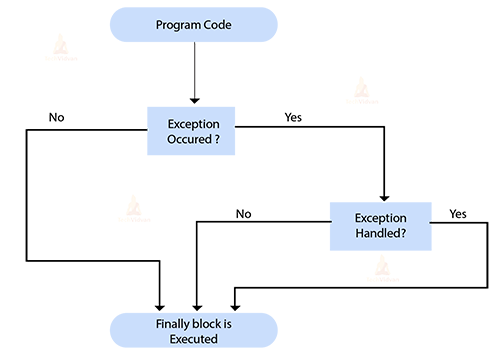
The finally block in Java is used to execute important code whether an exception occurs or not. It is mainly used for cleanup activities, such as closing files, releasing resources, or disconnecting databases.
The finally block in Java is used to write code that must execute no matter what happens in the try block. Whether an exception occurs or not, whether it is caught or not, the code inside finally always runs. Because of this behavior, the finally block is mainly used for resource cleanup, such as closing files, database connections, or releasing memory. It helps make the program safe and reliable by ensuring important cleanup code is not skipped.
Important points
The
finallyblock is always executed aftertryorcatch.It executes whether an exception occurs or not.
It is mainly used for resource cleanup.
A
finallyblock can be used with or without a catch block.Only one
finallyblock is allowed with atry.If no exception occurs,
finallystill runs after thetryblock.If an exception occurs and is caught,
finallyruns after thecatchblock.If an exception occurs and is not caught,
finallystill runs before program termination.The main use of
finallyis resource cleanup like closing files, streams, or database connections.The
finallyblock is executed even if areturnstatement is present intryorcatch.The
finallyblock does not run only in rare cases, such as when the JVM shuts down forcefully (for example,System.exit(0)).
Syntax of finally block
try {
    // risky code
} catch (ExceptionType e) {
    // handling code
} finally {
    // cleanup code
}
Example
public class FinallyExample {
    public static void main(String[] args) {

        int a = 10;
        int b = 0;

        try {
            int result = a / b;
            System.out.println(result);
        }
        catch (ArithmeticException e) {
            System.out.println("Exception handled");
        }
        finally {
            System.out.println("Finally block always executes");
        }

        System.out.println("Program continues...");
    }
}
Output
Exception handled
Finally block always executes
Program continues...
Step-by-step Explanation
The program starts execution normally.
The division
a / bcauses anArithmeticException.The exception is caught by the
catchblock and handled.After the catch block, the
finallyblock executes compulsorily.After
finally, the remaining program executes normally.
This shows that finally executes even when an exception occurs.
Case: No Exception Occurs
If b was not zero, then:
tryblock executes fullycatchblock is skippedfinallyblock still executes
throw keyword in Java
The throw keyword in Java is used to explicitly create and send an exception from a method or block of code.The throw keyword is used when the programmer wants to manually generate an exception based on a condition.
Sometimes the JVM does not automatically detect an error, but the programmer knows that a certain condition is wrong. In such cases, throw is used to manually raise an exception so that the normal flow of the program stops and control moves to the nearest matching catch block. This helps in enforcing rules and validating input in a clean and controlled way.
Important points
throwis used to explicitly raise an exception.It is written inside a method or block.
Only one exception can be thrown at a time.
The exception object is created using the
newkeyword.Control immediately moves to the nearest matching
catchblock.Commonly used for custom exceptions and input validation.
If an exception thrown using
throwkeyword and it is not handled by a catch block then the JVM’s default exception handler terminates the program.
Syntax
throw new ExceptionType("error message");
Example
int age = 15;

if (age < 18) {
    throw new ArithmeticException("Not eligible to vote");
}
The throw keyword is used to explicitly generate an exception object and hand it over to the JVM.
Example program
The throw keyword is used when the programmer wants to manually generate an exception based on a condition. In this example, we check age eligibility. If the age is less than 18, we explicitly throw an exception, and the JVM transfers control to the catch block.
class ThrowExample {
    public static void main(String[] args) {

        int age = 16;

        try {
            if (age < 18) {
                throw new ArithmeticException("Not eligible to vote");
            }
            System.out.println("Eligible to vote");
        }
        catch (ArithmeticException e) {
            System.out.println("Exception caught: " + e.getMessage());
        }

        System.out.println("Program continues normally");
    }
}
Output
Exception caught: Not eligible to vote
Program continues normally
What happens step by step
The program checks the value of
ageCondition becomes true (
age < 18)throwcreates anArithmeticExceptionobjectJVM jumps to the matching
catchblockException message is printed
Program continues after exception handling
Deep explanation

The throw keyword in Java is used when the programmer wants to create an error by himself instead of waiting for the JVM to create it automatically. Normally, the JVM throws exceptions like divide by zero or null access. But many real problems are logical problems, not system errors, such as invalid age, wrong password, or insufficient balance. In such cases, the programmer uses throw to manually stop the program flow and report the problem as an exception.
Why do we need throw
The JVM only throws exceptions for runtime errors (like division by zero).
But business rules are not known to the JVM.
Example:
Age must be ≥ 18
Balance must be ≥ 500
Marks must be between 0 and 100
To enforce these rules, we use throw.
What exactly throw does (step by step)
When Java sees a throw statement:
Java creates an exception object using
newThe normal execution stops immediately
JVM searches for a matching
catchblockIf found → exception is handled
If not found → JVM uses default handler and terminates the program
Syntax of throw
throw new ExceptionType("message");
throw → keyword
new → creates exception object
ExceptionType → type of problem
"message" → reason of error
FULL WORKING EXAMPLE
Example: Age validation
class ThrowDemo {
    public static void main(String[] args) {

        int age = 15;

        try {
            if (age < 18) {
                throw new ArithmeticException("Age is less than 18");
            }

            System.out.println("Eligible to vote");
        }
        catch (ArithmeticException e) {
            System.out.println("Exception caught");
            System.out.println(e.getMessage());
        }

        System.out.println("Program ends normally");
    }
}
Output
Exception caught
Age is less than 18
Program ends normally
Line-by-line understanding
age = 15→ invalid according to ruleif (age < 18)→ condition becomes truethrow new ArithmeticException(...)→ exception created manuallyJVM jumps to catch block
estores exception objecte.getMessage()prints error reasonProgram continues safely
Important rules of throw
throwis used to manually generate an exceptionIt is written inside a method or block
Only one exception can be thrown at a time
Exception object must be created using
newControl transfers immediately to
catchMostly used for validation and business logic
Difference from JVM-thrown exception
JVM throws | Programmer throws |
|---|---|
Divide by zero | Invalid age |
Null access | Wrong password |
Array overflow | Low balance |
What happens if we use throw without try-catch
When you use the throw keyword without a try-catch block, the exception is not handled by your program. In this situation, Java gives the responsibility to the JVM’s default exception handler. The JVM prints the error details and terminates the program immediately.
Full example (NO try-catch)
class ThrowWithoutTry {
    public static void main(String[] args) {

        int age = 15;

        if (age < 18) {
            throw new ArithmeticException("Age below 18");
        }

        System.out.println("Eligible to vote");
    }
}
Output
Exception in thread "main" java.lang.ArithmeticException: Age below 18
    at ThrowWithoutTry.main(ThrowWithoutTry.java:7)
What happens step by step
Condition
age < 18is truethrowcreates anArithmeticExceptionobjectNo
try-catchis foundJVM uses its default exception handler
Error message + line number are printed
Program terminates immediately
Code after
throwis not executed
Key points to remember
throwcan be used without try-catchProgram will crash if exception is not handled
JVM prints:
Exception type
Message
Stack trace
Statements after
throware never executed
With try-catch | Without try-catch |
|---|---|
Exception handled | Exception unhandled |
Program continues | Program terminates |
Controlled output | JVM error message |
throw+ no catch = program crash by JVM
throws keyword in Java
The throws keyword in Java is used to declare possible exceptions that a method may pass to its calling method. Instead of handling the exception inside the method, the method tells the caller that it might generate certain exceptions. This is mainly used for checked exceptions, where handling is mandatory. The responsibility of handling the exception is transferred to the caller.
OR
The throws keyword in Java is used to declare exceptions that a method may pass to the calling method. It tells the compiler and JVM that the method does not handle the exception itself and expects the caller to handle it.
Important points
The
throwskeyword is written in the method declaration.It is used to pass responsibility of exception handling to the calling method.
It is mainly used for checked exceptions.
Multiple exceptions can be declared using
throws, separated by commas.The method that calls a
throwsmethod must handle the exception or declare it again using throws.throwsdoes not throw an exception, it only declares it.The caller method must handle the exception using
try-catchor declare it again usingthrows.
Syntax
returnType methodName() throws ExceptionType1, ExceptionType2 {
    // code
}
Example
void readFile() throws IOException {
    FileReader fr = new FileReader("data.txt");
}
The throws keyword tells the caller that a method may pass an exception and handling is required. It is used to declare exceptions that a method does not handle and passes to the calling method.
Example of throws keyword
The throws keyword is used when a method does not handle the exception itself and instead passes the responsibility to the calling method. This example uses a checked exception (IOException), which must be handled.
Complete Java Program (with caller handling exception)
import java.io.FileReader;
import java.io.IOException;

class ThrowsExample {

    // Method declares exception using throws
    static void readFile() throws IOException {
        FileReader fr = new FileReader("data.txt");
        System.out.println("File opened successfully");
    }

    public static void main(String[] args) {

        try {
            readFile();
        }
        catch (IOException e) {
            System.out.println("Exception handled in main method");
        }

        System.out.println("Program continues normally");
    }
}
Output
Exception handled in main method
Program continues normally
What happens step by step
readFile()may causeIOExceptionMethod does not handle it, so it uses
throwsJVM passes exception to
main()main()handles it usingtry-catchexception handled and Program continues safely
The throws keyword declares possible exceptions and transfers handling responsibility to the caller. In exception handling programs, output depends on whether an exception occurs and where it is handled.
Point | throw | throws |
|---|---|---|
Purpose | Actually throws exception | Declares exception |
Usage | Inside method or block | In method signature |
Object creation | Yes ( | No |
Number | Only one exception | Multiple exceptions |
Responsibility | JVM immediately handles | Caller must handle |
Difference between throw and throws in Java
throw |
|
|---|---|
|
|
It is written inside the method or block. | It is written in the method declaration. |
It throws an exception object at runtime. | It does not throw an exception, it only informs the compiler. |
Only one exception can be thrown at a time. | Multiple exceptions can be declared using commas. |
Used for custom conditions or manual exception raising. | Used to shift responsibility of handling to the calling method. |
After | Method execution continues until an exception actually occurs. |
Can throw checked or unchecked exceptions. | Mostly used with checked exceptions. |
Exception must be handled using try–catch or declared using | Calling method must handle or further declare the exception. |
Example of throw
public class ThrowExample {
    public static void main(String[] args) {

        int age = 15;

        if (age < 18) {
            throw new ArithmeticException("Not eligible to vote");
        }

        System.out.println("Eligible to vote");
    }
}
Output
Exception in thread "main" java.lang.ArithmeticException: Not eligible to vote
Example of throws
import java.io.FileReader;

public class ThrowsExample {

    static void readFile() throws Exception {
        FileReader fr = new FileReader("data.txt");
    }

    public static void main(String[] args) {
        try {
            readFile();
        } catch (Exception e) {
            System.out.println("Exception handled");
        }
    }
}
Output
Exception handled
One-line exam-ready conclusion
throwis used to explicitly throw an exception, whereasthrowsis used to declare exceptions that a method may pass to the calling method.
Multiple catch blocks in Java
Multiple catch blocks are used when a single try block can throw more than one type of exception. Each catch block handles a specific exception type, allowing Java to respond differently to different errors.
Important points
One
tryblock can be followed by multiple catch blocks.Each catch block handles only one exception type.
Catch blocks are checked by the JVM from top to bottom.
The first matching catch block is executed.
If no matching catch block is found, the JVM uses its default exception handler and terminates the program.
A specific exception must be written before a general exception (
Exception).Writing
catch(Exception e)first causes a compile-time error.
Syntax
try {
    // risky code
}
catch (ExceptionType1 e) {
    // handling code
}
catch (ExceptionType2 e) {
    // handling code
}
Example with Multiple catch blocks
public class MultipleCatchExample {
    public static void main(String[] args) {

        try {
            int a = 10 / 0;          // may cause ArithmeticException
            int[] arr = new int[5];
            arr[10] = 50;            // may cause ArrayIndexOutOfBoundsException
        }
        catch (ArithmeticException e) {
            System.out.println("Arithmetic Exception handled");
        }
        catch (ArrayIndexOutOfBoundsException e) {
            System.out.println("Array Index Exception handled");
        }
        catch (Exception e) {
            System.out.println("General Exception handled");
        }

        System.out.println("Program continues...");
    }
}
Output
Arithmetic Exception handled
Program continues...
Step-by-step Explanation
The program enters the
tryblock.The division
10 / 0causes anArithmeticException.The JVM checks catch blocks from top to bottom.
The first matching catch block (
ArithmeticException) is found and executed.Remaining catch blocks are skipped.
After handling, the program continues normally.
In multiple catch blocks, the JVM executes the first matching catch block from top to bottom.
Nested try statements in Java
A nested try statement means placing one try block inside another try block. It is used when a part of the code inside a try block may cause another exception that needs separate handling.
OR
A nested try statement in Java means writing one try block inside another try block. This is used when a program has multiple risky operations, and each operation may throw different types of exceptions that need to be handled at different levels. Instead of handling everything in one place, nested try blocks allow more precise and controlled exception handling.
Important points (rules & behavior)
A
tryblock can be written inside another try block.Each
trymust have its own catch or finally.If an exception occurs in the inner try, Java first looks for a matching inner catch.
If no matching inner catch is found, the exception is passed to the outer catch.
Nested try is useful when different parts of code need different handling logic.
Why nested try is needed
Sometimes a program performs:
File operations
Array access
Mathematical operations
Each of these can fail in different ways. Using nested try blocks helps handle specific exceptions close to where they occur, while still allowing outer blocks to handle broader problems.
Syntax
try {
    // outer risky code
    try {
        // inner risky code
    }
    catch (ExceptionType e) {
        // inner handling
    }
}
catch (ExceptionType e) {
    // outer handling
}
Example of Nested try
public class NestedTryExample {
    public static void main(String[] args) {

        try {
            System.out.println("Outer try block");

            try {
                int a = 10 / 0;   // inner risky code
            }
            catch (ArithmeticException e) {
                System.out.println("Inner catch: Arithmetic Exception handled");
            }

            int[] arr = new int[3];
            arr[5] = 10;         // outer risky code
        }
        catch (ArrayIndexOutOfBoundsException e) {
            System.out.println("Outer catch: Array Index Exception handled");
        }

        System.out.println("Program continues...");
    }
}
Output
Outer try block
Inner catch: Arithmetic Exception handled
Outer catch: Array Index Exception handled
Program continues...
Step-by-step Explanation
Program enters the outer try block.
Control enters the inner try block.
Division by zero occurs, causing
ArithmeticException.The inner catch block handles the exception.
Program continues in the outer try block.
Array index error occurs, causing
ArrayIndexOutOfBoundsException.The outer catch block handles this exception.
Program continues normally after handling all exceptions.
Nested try blocks are used to handle different exceptions separately within a single program.
Re-throwing Exceptions in Java
Re-throwing an exception means catching an exception and then throwing it again so that it can be handled by another (usually higher-level) catch block. This is useful when a method wants to do something locally (like logging or printing a message) but does not want to fully handle the error. Instead, it passes the same problem upward to the caller.
Important points (rules & behavior)
An exception can be caught and thrown again using the
throwkeyword.Re-throwing passes the exception to the calling method.
It is commonly used to add extra information or log the error before passing it forward.
The method that re-throws the exception must declare it using
throws.If the exception is not handled at a higher level, the JVM default handler terminates the program.
Syntax
try {
    // risky code
}
catch (ExceptionType e) {
    // some action
    throw e;
}
e is the same exception object. No new exception is created (unless you want to)
Example of Re-throwing Exception
public class RethrowExample {

    static void method1() throws ArithmeticException {
        try {
            int a = 10 / 0;
        }
        catch (ArithmeticException e) {
            System.out.println("Exception caught in method1");
            throw e;   // re-throwing exception
        }
    }

    public static void main(String[] args) {
        try {
            method1();
        }
        catch (ArithmeticException e) {
            System.out.println("Exception handled in main method");
        }
    }
}
Output
Exception caught in method1
Exception handled in main method
Step-by-step Explanation
The program starts execution from
main.method1()is called inside a try block.Division by zero occurs inside
method1().The exception is caught in
method1().A message is printed, then the exception is re-thrown using
throw e.Control goes back to the calling method (
main).The exception is caught and handled in
main.The program continues normally.
Re-throwing an exception allows a method to catch an exception and pass it to the calling method for further handling.
Re-throwing exceptions — real meaning
Think of ATM money withdrawal.
ATM machine detects a problem (low balance)
ATM prints a slip / shows message (logging)
But ATM cannot decide what to do next
The bank server (caller) decides the final action
👉 ATM reports the problem again to the bank
This is exactly re-throwing.
Why re-throwing is needed (in simple words)
A method may:
Detect an error
Do some local work (print message, save log, clean resource)
But it cannot fully handle the situation
So it passes the same error upward
This is called re-throwing.
REAL PROGRAM EXAMPLE (Bank balance case)
Situation
withdraw()method checks balanceIt prints message (local work)
Final decision is taken by
main()(caller)
Full Java Program
class RethrowRealExample {

    static void withdraw(int balance, int amount) {

        try {
            if (amount > balance) {
                throw new ArithmeticException("Insufficient balance");
            }
            System.out.println("Withdrawal successful");
        }
        catch (ArithmeticException e) {
            // Local handling (log / message)
            System.out.println("Withdraw failed inside withdraw()");

            // Re-throwing to caller
            throw e;
        }
    }

    public static void main(String[] args) {

        try {
            withdraw(2000, 5000);
        }
        catch (ArithmeticException e) {
            // Final decision taken here
            System.out.println("Handled in main(): Transaction cancelled");
        }

        System.out.println("Program ends");
    }
}
Output
Withdraw failed inside withdraw()
Handled in main(): Transaction cancelled
Program ends
Step-by-step explain
withdraw(2000, 5000)is calledAmount > balance → error detected
Exception thrown
withdraw()catch block runsMessage printed (logging done)
Same exception is re-thrown
JVM moves to
main()main()decides final actionProgram continues normally
Now read this line again (it will make sense)
Sometimes a method detects the error and does local work, but the final decision should be taken by the caller, so the method re-throws the exception.
Re-throwing is used when a method wants to partially handle an exception and pass it to the caller for final handling.
Detect + log → re-throw
Final decision → caller
Exception propagation in Java
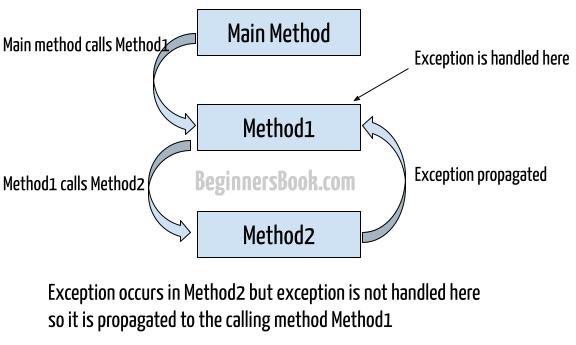
Exception propagation means when an exception occurs in a method and is not handled there, it is automatically passed to the calling method. If the caller also does not handle it, the exception keeps moving up the call stack until it is handled or until the JVM’s default exception handler terminates the program. In short, unhandled exceptions travel upward.
Important points
Exception propagation is automatic
It happens only when exception is not handled
Exception moves up the method call stack
Program stops only if no handler is found
Mostly seen with unchecked exceptions
Real-life idea
Think of complaint passing:
Worker finds a problem but cannot solve it → tells supervisor
Supervisor cannot solve → tells manager
Manager decides final action
This passing of the problem upward is exception propagation.
When exception propagation happens
An exception occurs in a method
There is no matching catch in that method
JVM passes the exception to the caller method
This continues until:
a catch block handles it, or
JVM handles it and stops the program
Example with 3 methods
class ExceptionPropagationExample {

    static void method3() {
        int a = 10 / 0;   // ArithmeticException
    }

    static void method2() {
        method3();       // no try-catch here
    }

    static void method1() {
        method2();       // no try-catch here
    }

    public static void main(String[] args) {

        try {
            method1();
        }
        catch (ArithmeticException e) {
            System.out.println("Exception handled in main()");
        }

        System.out.println("Program continues normally");
    }
}
Output
Exception handled in main()
Program continues normally
Step-by-step execution
main()callsmethod1()method1()callsmethod2()method2()callsmethod3()Division by zero occurs in
method3()No catch in
method3()→ exception propagatesNo catch in
method2()→ propagatesNo catch in
method1()→ propagatesmain()has catch → exception handledProgram continues normally
What if nobody handles it?
Same program without try-catch in main()
public static void main(String[] args) {
    method1();
}
Output
Exception in thread "main" java.lang.ArithmeticException: / by zero
➡ JVM default handler runs
➡ Program terminates
Checked vs unchecked
Type | Propagation |
|---|---|
Unchecked exception | Propagates automatically |
Checked exception | Must be declared using |
Exception propagation is the process by which an unhandled exception is passed from one method to its caller until it is handled or the program terminates.
No catch → move up
Exception Propagation vs Re-throwing
Exception Propagation | Re-throwing Exception |
|---|---|
Happens automatically when an exception occurs in a method and that method does not handle it. The programmer does nothing explicitly. | Happens when a programmer catches an exception and then intentionally throws it again using |
The exception moves upward through the method call stack because no matching | The exception moves upward because the programmer wants the caller to handle it after doing some local work. |
No local action such as logging, printing messages, or cleanup is performed in the method where the exception occurs. | The method performs partial handling like logging the error, printing a message, or releasing resources before throwing it again. |
Control transfers directly to the calling method without stopping at the current method. | Control first stops in the |
Mostly seen in unchecked exceptions like | Used in both checked and unchecked exceptions when controlled error handling is required. |
The programmer has less control over where and how the exception is finally handled. | The programmer has more control and decides who should handle the exception finally. |
Used when a method cannot or should not handle the exception at all. | Used when a method understands the problem but should not decide the final outcome. |
Example idea: A method fails and simply passes the problem upward because it has no solution. | Example idea: A method detects a problem, logs it, and asks the caller to decide what to do next. |
No catch block → propagation | Catch + throw again → re-throwing |
Multiple catch clauses in Java
Multiple catch clauses are used when a single try block may produce different types of exceptions, and each exception needs to be handled in a different way.
Instead of writing separate try blocks, Java allows you to write multiple catchblocks after one try, where each catch handles a specific exception type. The JVM checks the catch blocks from top to bottom and executes only the first matching one.
Syntax
try {
    // risky code
}
catch (ExceptionType1 e) {
    // handling code
}
catch (ExceptionType2 e) {
    // handling code
}
Example
class MultipleCatchExample {
    public static void main(String[] args) {

        try {
            int arr[] = {10, 20, 30};

            int x = arr[2] / 0;     // ArithmeticException
            System.out.println(x);

            arr[5] = 40;           // ArrayIndexOutOfBoundsException
        }
        catch (ArithmeticException e) {
            System.out.println("Arithmetic Exception handled");
        }
        catch (ArrayIndexOutOfBoundsException e) {
            System.out.println("Array Index Exception handled");
        }
        catch (Exception e) {
            System.out.println("General Exception handled");
        }

        System.out.println("Program continues normally");
    }
}
Output
Arithmetic Exception handled
Program continues normally
Step-by-step understanding
JVM enters the
tryblockDivision by zero occurs
JVM checks catch blocks in order
First matching catch (
ArithmeticException) is executedRemaining catch blocks are skipped
Program continues normally
Important rules
Multiple
catchblocks can follow onetryOnly one catch block executes for one exception
Catch blocks are checked top to bottom
Child exception must come before parent exception
Exception(generic) should be written last
Wrong order (exam trap ❌)
catch (Exception e) { }
catch (ArithmeticException e) { } // Compile-time error
👉 Parent written first makes child unreachable.
Correct order (exam safe ✅)
catch (ArithmeticException e) { }
catch (Exception e) { }
Multiple catch clauses allow handling different types of exceptions separately using a single try block.
User-defined Exception in Java
A custom exception (also called user-defined exception) is an exception created by the programmer to represent application-specific errors. Java provides many built-in exceptions, but they are not enough to describe business rule violations like invalid age, low balance, or wrong marks. In such cases, programmers create their own exception class to clearly represent the problem.
Important points
User-defined exceptions are created by extending the
Exceptionclass.They are used to represent custom error conditions.
A user-defined exception can have a custom error message.
These exceptions are thrown using the
throwkeyword.The method throwing a user-defined exception must handle it or declare it using
throws.User-defined exceptions are generally checked exceptions.
Why do we need custom exceptions
Built-in exceptions are generic
Business rules are application specific
Custom exceptions make code:
Clear
Meaningful
Easy to debug
Exam-friendly
Example:
AgeNotValidExceptionInsufficientBalanceExceptionInvalidMarksException
Creating your own exception subclasses
Creating your own exception subclass means defining a new exception class by extending an existing exception classlike Exception or RuntimeException. Java’s built-in exceptions are general, but real programs have application-specific rulessuch as invalid age, low balance, or wrong marks. To represent these situations clearly, programmers create their own exception subclasses. This makes the code more readable, meaningful, and easier to handle.
What does “exception subclass” mean
Exceptionis a parent classYour custom exception becomes a child class
Your class inherits behavior of Java exceptions
JVM treats it like a real exception
Steps to create your own exception subclass
Create a class
Extend
Exception(checked) orRuntimeException(unchecked)Create a constructor
Pass message to
super()Throw it using
throw
Syntax
class CustomException extends Exception {
    CustomException(String message) {
        super(message);
    }
}
Example of User-defined Exception
// Creating user-defined exception
class InvalidAgeException extends Exception {
    InvalidAgeException(String msg) {
        super(msg);
    }
}

public class UserDefinedExceptionExample {

    static void checkAge(int age) throws InvalidAgeException {
        if (age < 18) {
            throw new InvalidAgeException("Age is not valid for voting");
        }
        System.out.println("Eligible to vote");
    }

    public static void main(String[] args) {
        try {
            checkAge(15);
        }
        catch (InvalidAgeException e) {
            System.out.println(e.getMessage());
        }
    }
}
Output
Age is not valid for voting
Step-by-step Explanation
A custom exception class
InvalidAgeExceptionis created by extendingException.The constructor passes the error message to the parent
Exceptionclass usingsuper().The
checkAge()method checks the condition.If the condition fails, a user-defined exception is thrown using
throw.The calling method (
main) handles the exception usingtry–catch.The error message is displayed, and the program does not crash.
FULL PROGRAM — Custom Checked Exception Subclass
Example: Invalid Age
// Step 1: Create your own exception subclass
class AgeNotValidException extends Exception {

    AgeNotValidException(String message) {
        super(message);
    }
}

// Step 2: Use the custom exception
class TestCustomException {

    static void checkAge(int age) throws AgeNotValidException {

        if (age < 18) {
            throw new AgeNotValidException("Age must be 18 or above");
        }

        System.out.println("Eligible to vote");
    }

    public static void main(String[] args) {

        try {
            checkAge(16);
        }
        catch (AgeNotValidException e) {
            System.out.println("Exception caught");
            System.out.println(e.getMessage());
        }

        System.out.println("Program ends normally");
    }
}
Output
Exception caught
Age must be 18 or above
Program ends normally
What is happening here
AgeNotValidExceptionis a subclass of ExceptionJVM treats it like a normal exception
throwcreates and raises the exceptionthrowsdeclares it to the callercatchhandles it safely
Custom Unchecked Exception Subclass
class LowBalanceException extends RuntimeException {

    LowBalanceException(String message) {
        super(message);
    }
}
Usage:
throw new LowBalanceException("Insufficient balance");
Checked vs Unchecked Custom Exceptions
Checked Custom Exception | Unchecked Custom Exception |
|---|---|
Extends | Extends |
Must be handled | Handling optional |
Uses | No |
Compile-time checking | Runtime checking |
Very important exam lines
A user-defined exception is created by extending
ExceptionIt represents application-specific errors
Custom exception classes improve clarity and control
They are thrown using
throwand handled usingtry-catch
Creating own exception subclasses means defining user-defined exception classes by extending Java’s exception classes to handle application-specific errors.
Quick Revision
1️⃣ Error vs Exception (very common question)
Error
Serious system problem (memory, JVM failure).
Cannot be handled by program.
Example:OutOfMemoryErrorException
Runtime problem due to code or input.
Can be handled using try-catch.
Example:ArithmeticException
👉 Exam line:
Errors are not recoverable, exceptions are recoverable.
2️⃣ Why Exception Handling is Needed
Prevents program crash
Handles runtime errors safely
Keeps program flow normal
Shows meaningful error messages
👉 Example idea:
Without try-catch → program stops
With try-catch → program continues
3️⃣ Types of Exceptions (structure question)
Built-in Exceptions
Checked exceptions (compile time)
Unchecked exceptions (runtime)
User-defined Exceptions
Created by programmer
👉 Exam line:
Built-in exceptions are provided by Java, user-defined are created by programmer.
4️⃣ Checked vs Unchecked Exceptions (very important)
Checked
Checked at compile time
Must be handled
Example:
IOException
Unchecked
Checked at runtime
Handling optional
Example:
NullPointerException
👉 GATE idea:
Compiler forces handling only for checked exceptions.
5️⃣ Exception Hierarchy (diagram + theory)
Throwable
 ├── Error
 └── Exception
      ├── Checked
      └── RuntimeException (Unchecked)
👉 Interview line:
All exceptions and errors inherit from Throwable.
6️⃣ try block (concept)
Contains risky code
Exception occurs only inside try
Must be followed by catch or finally
👉 Example:
Division, file access, array index
7️⃣ catch block (JVM concept – important)
Handles exception from try
JVM matches exception type
Checked top to bottom
If no match → JVM default handler runs → program terminates
👉 Very important line:
If no matching catch is found, JVM terminates the program.
8️⃣ finally block (guaranteed question)
Always executes
Used for resource cleanup
Runs whether exception occurs or not
Does not run only with
System.exit()
👉 Example use:
Closing file, DB connection
9️⃣ throw keyword (difference concept)
Used to manually throw exception
Used inside method or block
Throws one exception object
👉 Example idea:
Age validation, custom condition
🔟 throws keyword (flow concept)
Declares exception
Passes responsibility to caller
Mostly used with checked exceptions
👉 Interview line:throws does not throw exception, it only declares it.
1️⃣1️⃣ throw vs throws (very common)
throw→ creates exceptionthrows→ declares exception
👉 One-line exam answer:throw is used to explicitly throw an exception, throws is used to declare it.
1️⃣2️⃣ Multiple catch blocks (rule question)
One try → many catch
Specific exception first
General exception last
👉 Compile-time error:
If Exception is written before specific exception.
1️⃣3️⃣ Nested try (flow question)
try inside another try
Inner exception handled first
If not handled → goes to outer catch
👉 Use case:
Different parts need different handling.
1️⃣4️⃣ Re-throwing Exception (interview favorite)
Catch exception
Do some work (log, message)
Throw it again to caller
👉 Example idea:
Method logs error but main decides action.
1️⃣5️⃣ User-defined Exception (practical question)
Created by extending
ExceptionUsed for custom rules
Thrown using
throw
👉 Example idea:
Invalid age, insufficient balance
10 MOST IMPORTANT EXAM / INTERVIEW LINES (MEMORIZE)
Exception is a runtime problem that can be handled.
Errors are system-level and not handled.
Checked exceptions are checked at compile time.
Unchecked exceptions occur at runtime.
JVM looks for matching catch block.
finally block always executes.
throwthrows exception,throwsdeclares it.Specific catch must come before general catch.
Re-throwing passes exception to caller.
User-defined exceptions extend
Exception.
Q1. Exception handling in Java with example
Answer:
Exception handling in Java is a mechanism used to handle runtime errors so that the program does not terminate abnormally. It is done using try, catch, and finally.
Example idea: division by zero handled using try–catch so the program continues.
Q2. Difference between error and exception in Java
Answer:
An error is a serious system-level problem that cannot be handled by the program, while an exception is a runtime problem that can be handled using exception handling code.
Q3. Checked vs unchecked exception interview question
Answer:
Checked exceptions are checked at compile time and must be handled, whereas unchecked exceptions are checked at runtime and handling them is optional.
Q4. Difference between throw and throws in Java
Answer:throw is used to explicitly throw an exception, while throws is used to declare exceptions that a method may pass to the calling method.
Q5. Why finally block always executes?
Answer:
The finally block always executes to ensure that important cleanup code like closing files or releasing resources runs whether an exception occurs or not.
Q6. User-defined exception in Java with example
Answer:
A user-defined exception is created by the programmer by extending the Exception class to handle application-specific errors such as invalid age or insufficient balance.
Q7. What happens if an exception is not handled in Java?
Answer:
If an exception is not handled, the JVM uses its default exception handler, prints the error details, and terminates the program abnormally.
Q8. Who handles the exception if no catch block is present?
Answer:
If no catch block is present, the JVM’s default exception handler handles the exception and stops program execution.
Q9. Why is finally block used in Java?
Answer:
The finally block is used to execute important cleanup code such as closing files or database connections, regardless of whether an exception occurs or not.
Q10. Can we handle Error in Java? Why not?
Answer:
No, errors cannot be handled because they are serious system-level problems and are beyond the control of the program.
Q11. Why do checked exceptions exist in Java?
Answer:
Checked exceptions exist to force the programmer to handle recoverable errors at compile time, which improves program reliability.
Q12. What is re-throwing an exception?
Answer:
Re-throwing an exception means catching an exception and then throwing it again so that it can be handled by the calling method.
One-Line Rapid Revision
JVM handles exception if no catch block exists
finally block is for cleanup
Errors are not handled
Checked exceptions are compile-time
Unchecked exceptions are runtime
throw throws, throws declares
Conclusion
These notes are specially prepared as semester notes and handwritten Java notes for BTech CSE (AI & ML) students of Bihar Engineering University (BEU) following the new syllabus 2025–26. The main goal of these notes is to help students of 3rd semester understand Java concepts easily and revise effectively before exams. I have written these handwritten-style notes by keeping real exam patterns, viva questions, and concept clarity in mind, so they are useful not only for semester exams but also for interviews and basic GATE preparation.
My name is Sonu, and I am a BTech CSE (AI & ML) student from Madhepura College of Engineering, batch 2025–2028. I personally prepared these notes with a lot of effort, time, and continuous revision so that students can get clear, reliable, and exam-oriented BEU notes in one place through NotesNav. If you find any mistake, typo, or concept issue in these notes, you can report it to us so we can improve and update the content for everyone.
Preparing quality handwritten notes, semester notes, and PDF resources takes a lot of hard work and dedication. If these notes help you in your studies, exams, or understanding concepts, please consider supporting NotesNav financially. Your support motivates me to keep creating more BTech notes, BEU syllabus notes, and quality study material for students like you.
🙏 Thank you for supporting NotesNav and trusting these notes for your academic journey.